Showing posts with label digital learning. Show all posts

Sunday, April 16, 2023

5 Clear Ways Digital Benefits Learners

The education landscape is undergoing a continuous transformation, something I elaborate on in detail in Disruptive Thinking in Our Classrooms. While not new in any sense, digital tools continue to play an immense role as they are constantly evolving. By understanding how these tools impact teaching and learning, educators can determine which ones to use and how to implement them effectively.


Innovative assessments

The changing formats and contexts of assignments have necessitated a corresponding evolution in assessment methods. With the online environment's openness and the integration of game elements and real-time feedback, a wide range of assessment options have materialized. There are many options to create and implement various forms of formative assessment, which measures progress in ongoing learning rather than endpoints. With instant data reporting and analysis, educators can respond more effectively to learner needs.

Improved collaboration

Similar to how social media has redefined the notion of community, digital tools are also changing the dynamic between students and teachers, affecting how they interact and collaborate. For instance, online platforms for discussion threads and learning management systems (LMSs) alter how students engage in writing and project-based assignments. Collaborative exchanges among peers, teachers, authors, and mentors can turn a simple student writing product into a multifaceted and informative artifact. Moreover, when used appropriately, digital tools can also foster various dimensions of disruptive thinkers by empowering students to be creative scholars, reflective learners, active engagers, self-directed managers, and autonomous inquirers.

Instant Access 

Once connected to the Internet, the opportunities to access information and resources are limitless. While projects still require substantive research, relevant synthesis, and audience-oriented approaches, students today can access tools that help them analyze and understand various representations from diverse disciplines and subjects, including texts, data, and photographs, in a world overflowing with information. While acquiring knowledge is plentiful, digital literacy is a must.

Ownership of Learning 

John Dewey once stated that activities that truly engage students "give pupils something to do, not something to learn; and the doing is of such a nature as to demand thinking or the intentional noting of connections; learning results "naturally." The availability of numerous free digital tools now allows students to engage in such activities. By selecting appropriate tools, students can create artifacts that demonstrate their conceptual mastery while acquiring and applying essential skill sets. This process of choice not only increases engagement and authenticity but also adds value to the learning experience. When aligned with personalized pedagogy, harnessing the power of digital tools can help students take charge of their learning and become more self-directed in their education.

Flexible Use of Time 

In many cases, digital tools provide an asynchronous response and inquiry platform, which is impossible in traditional brick-and-mortar classrooms. Whether written or video-based, online discussions offer diverse perspectives, collaborative opportunities, and time for contemplation and planning before responding. There is an array of personalized strategies where digital tools can be used to maximize the available use of time, including station rotation, choice activities, playlists, flipped lessons, and virtual courses. To learn more, check out this post.

While this list is not comprehensive, it provides a clear rationale for how digital tools can support and enhance learning in and out of the classroom. Purposeful use by the learner is vital. The Relevant Thinking Framework is a fantastic resource that can be leveraged when planning lessons, tasks, and assessments.


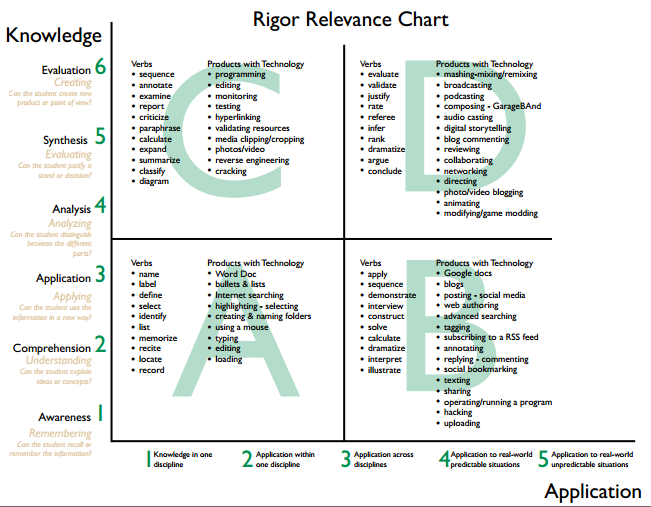
Don’t get caught up where a particular tool in the image is located. While a Word Doc can be used in a low rigor, low relevant way, it can also be used in a high rigor, high relevant fashion. It is how the tool is used to construct new knowledge and demonstrate understanding in various ways that genuinely matter.

Sunday, August 18, 2019

Buncee and Immersive Reader: A Winning Combination for Assistive Learning

I am a huge fan of Buncee. The following is a guest post by Rachelle Dene Poth (@Rdene915), Spanish and STEAM Teacher at Riverview High School in PA.

For several years, Buncee has been one of my favorite creation tools; both for personal use and for classroom instruction. While there are many digital tools to choose from when it comes to teaching and having our students create, Buncee’s versatility and ease-of-use make it a go-to tool for all creative needs. Now, Buncee’s recent integration with Microsoft’s Immersive Reader makes the platform even more accessible for students of diverse ages, backgrounds, and abilities to learn 21st-Century Skills and express themselves. What my students love the most is that Buncee offers something for everyone, and I love that they love it.


Always keeping a finger on the pulse of their community’s needs, the Buncee team consistently listens to their community and refines the platform based on this! Their integration with Immersive Reader is a perfect example of this.

Immersive Reader: It’s About Opportunities For ALL Students 

This summer, Buncee integrated with Microsoft’s Immersive Reader, increasing accessibility for students and offering a robust environment to build literacy skills. Immersive Reader is a full-screen accessibility tool, supporting the readability of text in Buncees for language learners and their families and students with dyslexia or visual impairments. Any text added into a Buncee can be translated and read aloud in over 60 languages.

There are many ways Immersive Reader can enhance learning opportunities for students. It can help to build their confidence and create an inclusive classroom environment. Educators can use this integration to create lessons, make interactive flashcards for students, and communicate with families. Inclusive learning and providing for students and families from different backgrounds is something that the Buncee and the Microsoft team are definitely passionate about, making this integration a natural fit.

Imagine the possibilities for reaching students and their families of non-native English speaking homes, or supporting students who are just learning to read. The use of Immersive Reader in Buncee enables students to do more than just create multimedia content, it helps them improve reading and language learning skills as they engage with the content in authentic and meaningful ways. 

How Does Immersive Reader Work in Buncee? 

There are several ways to help students build their skills through the different options available within Buncee and using Immersive Reader. Getting started with Immersive Reader in Buncee is easy.

By clicking on the Immersive Reader icon when viewing a Buncee, a personalized reading and learning experience for students appears. Immersive Reader accesses the text in the Buncee, offering a multitude of options. Families can access these features at home as well, without having to log into or need any specific account. 

Navigating the Immersive Reader Functionality In Buncee

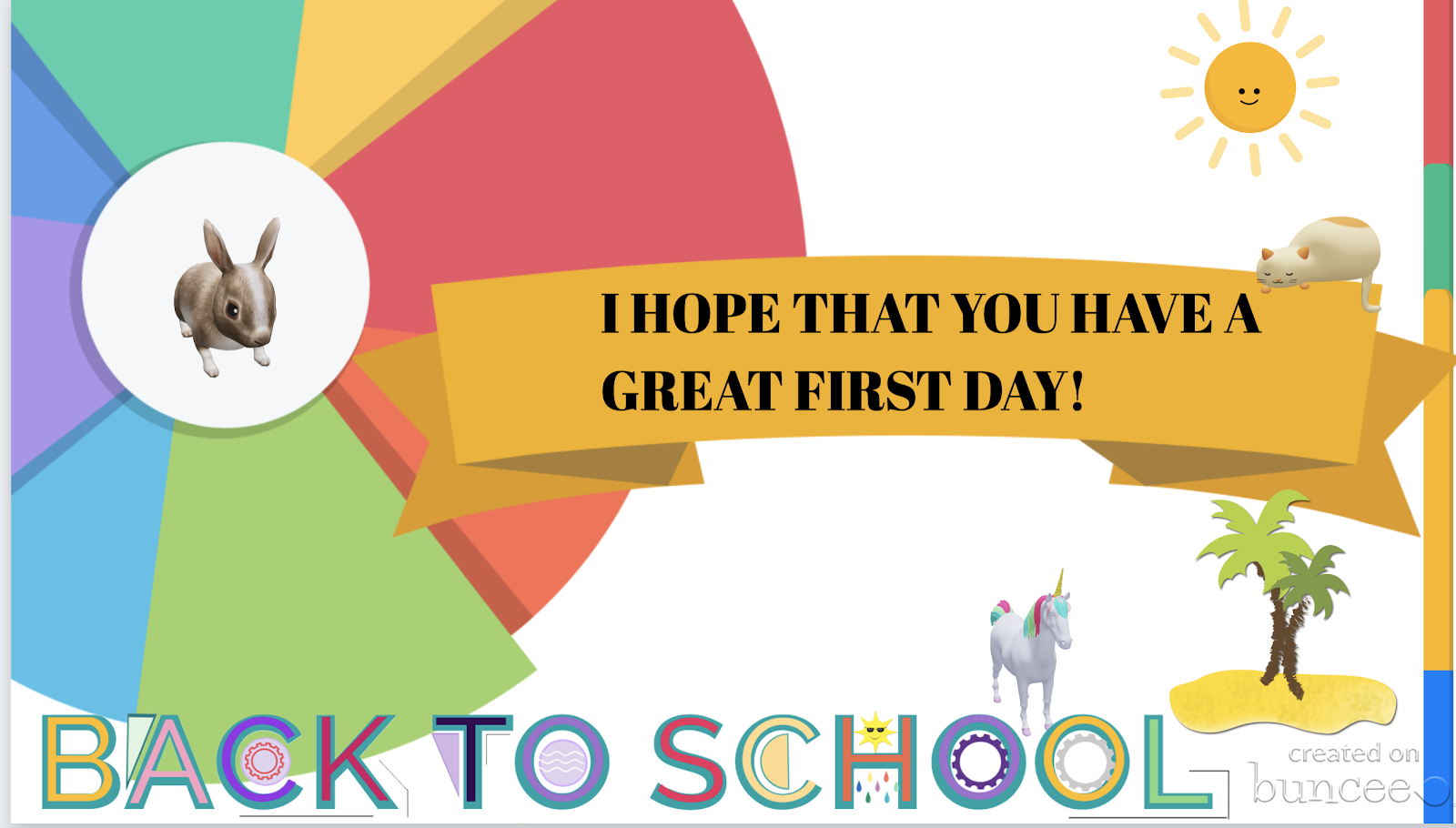
I decided to create a Buncee using some of the new 3D objects and also explore the options available through Immersive Reader. For first time users, it is easy to figure out how to adjust the settings. 

First, I clicked on the speaker symbol at the bottom to listen to the text read aloud. Students could use this as a way to practice their own pronunciation, especially when using it for language learning, by repeating after the speaker. Students can also build listening comprehension skills by focusing on written words and making connections with the audio. 


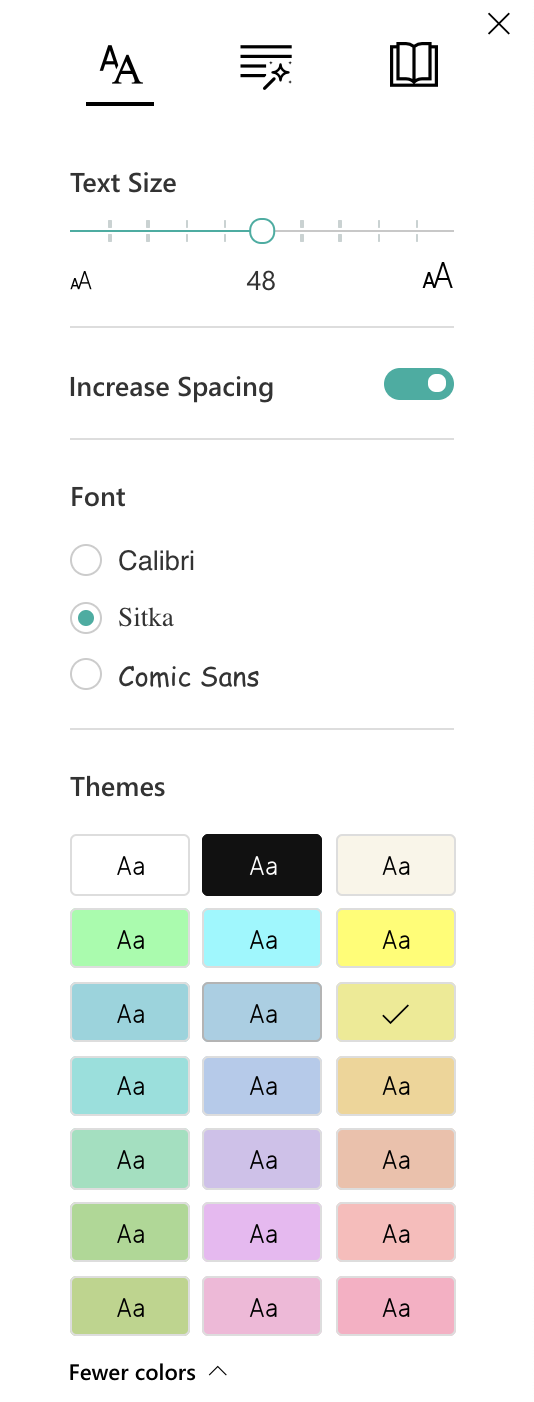
By clicking on text preferences, I can choose the text size, increase spacing, and select from three choices in font style. These are great options to help with readability for students. There are also 21 color choices for the background on the screen. I find this to be very useful, especially as someone who can be sensitive to certain colors when reading. I've also had students experience difficulty with reading on certain colored backgrounds, so this is a definite plus. 


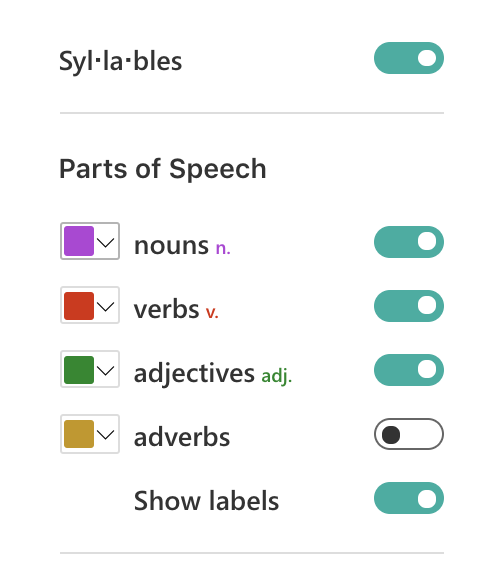
The grammar options enable you to break words up by syllables and also color code the different parts of speech. Being able to use the color codes to help with the identification of nouns, verbs, adjectives, and adverbs will help students to build their grammar skills. These labels can be turned on or off, which means that families can work with their children and use it as a teaching tool for review. 


Just to experiment, I turned everything off except for the verbs. Displayed on the screen were the two verbs in the sentence both highlighted in red. I then selected a different color for each part of speech, I chose purple to identify nouns and green for the adjectives. I was amazed at how quickly this could be set up and the possibilities for helping students with reading comprehension and language skills. Using this as a way to further engage students with identifying parts of speech and making the visual connection is another option for more interactive learning.

Under reading preferences, you can focus on one line or on the entire text.

When you focus on a line, it closes the screen down to that one specific sentence, which you can also make narrower or thicker depending on your choice. 


There are more than 60 languages available for translation. I decided to try French first, and when I clicked on a word, it showed me the word in French and in English. I also explored other languages, including Spanish and was impressed with how much it offered to reinforce the content and to provide a more personalized learning experience for students. There is also a picture dictionary to visually reinforce vocabulary acquisition. You can choose the voice and speed of reading, so it provides a great way to reinforce speaking skills as well as listening, reading and writing. 


In his book, Digital Leadership, Eric Sheninger talks about the critical competencies needed by learners for success in today’s world. These competencies are in alignment with the ISTE standards for students and teachers and can be addressed through the use of Buncee. Now with the Immersive Reader integration, the possibilities to address these standards are open to all learners. Beyond the potential for creativity, collaboration, critical thinking, and communication, students using Buncee can build skills in digital media literacy, entrepreneurship, technological proficiency, and digital citizenship. Students have the opportunity to use technology as a tool for solving real-world problems and making real-world connections. We have to look beyond simply using digital tools to engage students in learning and instead, empower them through opportunities to apply what they have learned in unique ways. 

Sunday, November 19, 2017

School of Dreams

As many people know I am originally from the Northeastern part of the United States.  I was born and raised in New Jersey, where I also became a teacher and eventually a principal.  After meeting my wife in 2002, I moved to Staten Island, NY and resided there for thirteen years. To be honest, I never thought I would leave that area of the country as my wife, and I had such strong roots there. Things change, however.  The successful digital transformation at the school where I was principal attracted a great deal of attention from the mainstream media, schools locally and globally, and organizations, in part because we were able to show efficacy in our work.  It was at this time that I decided to take a calculated risk and attempt to help other schools scale their digital and innovative change efforts.

As I transitioned from principal to Senior Fellow with the International Center for Leadership in Education (ICLE) my work began to take me all over the country and the world.  I vividly remember the day when I was away working in Hawaii, and Staten Island got dumped with over a foot of snow.  Shortly after I returned home, my wife sat me down and gave me an ultimatum.  I either had to go back to being a principal so I could be home to shovel any and all snow in the future or we had to move somewhere else in the county where it was warm and didn’t snow at all.  My wife knew full well how much I love the work that I do so out came a map of the United States and the discussions as to where we would raise our family for the foreseeable future began.

During our discussions, I had to set my non-negotiables.  She wanted warmth and no snow while I needed a huge airport that was centrally located to cut my flight times and connections down.  There were only two realistic choices at this point, Dallas and Houston. Since Houston was a bit further south and we could get the exact home we wanted the decision was made.  One other factor that weighed heavily in our decision-making process was the school district that our children would attend.  The icing on the cake for me was that when it was all said and done taking into account our non-negotiables, we decided to build our home within the Cypress-Fairbanks Independent School District (CFISD). 

CFISD is an amazing school district that is not only one of the highest achieving large districts in the state of Texas, but also firmly committed to scaling innovative practices to improve learning for all 120,000 students. For the past year and a half, my team and I at ICLE have been assisting the district with doing Bring Your Own Technology (BYOT) K-12, incorporating blended learning, and aligning sound pedagogy to the use of flex spaces.  We have also used our Digital Practice Assessment (DPA) process to help them determine where they are at, but more importantly where they want to be for their learners. Now back to my story.

Shortly after arriving in the Houston area I was contacted by Cheryl Fisher, a local CFISD elementary principal.  She had been following me on Twitter and asked if I would be willing to visit her school and see how they were implementing blended learning across all grade levels.  What I saw just warmed my heart, but more on this later.  A little over a year later Cheryl was named the principal of Wells Elementary, a brand-new school right smack in the middle of the community where I lived.  I couldn’t control my excitement, but there was a challenge ahead in the form of my daughter, Isabella.


Bella, who was in 4th grade at the time, had a big decision to make. Stay in the other community school where she had made friends for two years or go to a brand-new school for her last year of elementary school. To be honest, she was leaning on staying put. I discussed this with Cheryl, and she said quite bluntly, “If your daughter decides to come to Wells she will love learning every day.” Well, I was already hooked, but Cheryl also made the time to meet with Bella and explain in detail the vision she had for the learning culture at Wells.  What followed was the waiting in anticipation of what Bella would decide to do. 

Well, my daughter, on her own without much pressure from my wife and I, decided to attend Wells Elementary. Every day I ask her how school was and literally tear up when she responds as the answer is always the same – “It was great Daddy.” My daughter is entirely in love with the school. As an educator and parent, this means so much more to me than her consistently being advanced proficient every year on all standardized tests.  Wells Elementary to me is a school of dreams because my daughter loves learning.  Here are some specifics as to why:
  • School-wide decision to have no homework.
  • Students K-5 are empowered to use their technology to support their education as part of BYOT. In addition to this, technology is used to support and enhance learning while providing authentic opportunities to explore concepts.
  • Strategic use of the station rotation blended learning model to maximize learning time and increase student agency.
  • Incorporation of flexible learning spaces throughout the building.
  • Portfolio-based assessment using Seesaw and Google Classroom to provide better feedback to students.
  • An entire staff that believes in the power of being connected and the importance of having a Personal Learning Network (PLN).
  • Systemic use of a variety of social media tools to communicate with stakeholders and keep them in the know.
I encourage you to check out this video where Cheryl and one of her teachers discuss the digital transformation at Wells Elementary.


It is important to know I am not just making the casual statements about using only my parent lens.  I am honored by the fact that I am the one who is engaged with Wells as part of ICLE’s partnership with CFISD to support the district with our Digital Leadership and Learning solutions.  As the job-embedded coach for the school, I have been working with the teachers and administrators and will continue to do so throughout the school year.  Even though there are some fantastic initiatives in place as mentioned above, the Wells community knows that there is room for improvement.  This is the case in any classroom, school, or district. Together we are working on the pedagogical shifts needed to support their bold vision and plan for innovative learning.  

All in all, this is a school of dreams in my opinion.  The fact that my daughter loves learning and is being prepared for her future means the world to my wife and me.  Thank you to all the educators at Wells and CFISD who are have brought so much joy to my daughter. With the compelling learning opportunities she is experiencing, I hope that she will be further motivated to follow her dreams, no matter what they are. 

Sunday, February 26, 2017

A Pedagogical Shift Needed for Digital Success

In a previous post I discussed in detail strategies to help ensure the effective use of technology to improve learning outcomes. You don’t have to be a fan of technology, but you do need to understand that it’s a catalyst for some exciting pedagogical changes.  The purposeful use of technology can innovate assessment, transform time frames around learning, increase collaboration, enable learning about information and research thanks to unprecedented access, and provide a level of student ownership like never before. These are all outcomes that any educator would (or should) openly embrace. 

I get the fact that technology can increase engagement, but if that engagement does not lead to evidence of learning then what’s the point?  Like it or not, all educators are being held accountable in some form or another for improvement in learning outcomes that result in an increase in achievement.  This is why evidence of a return on instruction (ROI) when integrating technology is critical. Just using it to access information is also not a sound use. As teachers and administrators we must be more intentional when it comes to digital learning.  If the norm is surface-level integration that asks students to demonstrate knowledge and comprehension the most beneficial aspects of digital are missed. A recent article by Beth Holland for Edutopia reinforced many of my thoughts as of late on this topic. Below some words of caution from her:
“The dissemination of digitized, teacher-driven content is not full blended learning. Though this can be viewed as a first step toward new models of learning, the peril lies in complacency. When blended learning is equated with digital workflow, students remain consumers of teacher-directed content instead of becoming creators of knowledge within a context that they can actively control.”
Student agency is one of the most powerful improvements that technology can provide.  This is the ultimate goal in my opinion, but to begin to set the stage for consistent, effective use a uniform pedagogical shift has to be our focus when it comes to digital learning.  The Rigor Relevance Framework provides a solid lens to look at the learning tasks that students are engaged in and redesign them in ways that move away from telling us what they know and instead showing whether or not they actually understand.


This simple, yet powerful shift can be applied to all digital activities. Now I full understand there is a time and place for basic knowledge acquisition and recall, especially at elementary level. However, the goal should be an evolution in pedagogy, especially assessment, where students can demonstrate conceptual mastery in a variety of ways. Instead of using technology to ask students what the capitol is of a state or country ask them to create a brochure using a tool of their choice and explain why the capitol is located where it is.  When designing digital learning tasks think about how students can demonstrate understanding aligned to standards by:
  • Arguing  
  • Creating
  • Designing 
  • Inventing
  • Concluding
  • Predicting
  • Exploring
  • Planning
  • Rating
  • Justifying
  • Defending
  • Comparing
It is important to understand that the verbs above should apply to a range of innovative learning activities, not just those involving digital tools.  By moving away from the use of technology to support low-level learning tasks we can really begin to unleash it’s potential while providing students with greater relevance through authentic work.  This shift will take some time, but the ultimate learning payoff is well worth it. Below are some examples of how my teachers made this shift when I was the principal at New Milford High School:
Mr. Groff’s history classes utilized Paperlet, a participatory technology platform where students created digital stories that incorporated various multimedia elements including video, sound, and image files. The students worked with Mrs. Fleming on Google Chromebooks in the library to design their e-books. During the course of the activity students made recommendations to Paperlet designers on needed changes and enhancements, which were immediately made to improve student experiences.  
Students in Mrs. Groff’s Voices in Poetry and Prose classes had been reading independently since the beginning of the school year. They chose their own books to read based on their interests and reading levels. Students then worked with Mrs. Groff and Mrs. Fleming to create book trailers on their favorite books. Students used WeVideo, Windows Movie Maker, iMovie, and other available technologies to create their videos. These trailers were then loaded onto WeVideo and a hash tag was used to share and get feedback from all over the world. 
Jessica Groff and Joanna Westbrook created an ELA task that incorporated Twitter into their unit on Julius Caesar and built on content authentic to the play – i.e. social media repurposed with and for academic discourse. To accomplish their goals, these teachers began with an informational text on the history of the Roman Forum to ground their use of social media in historical discourse and academic content. In addition, the teachers worked with students to reverse engineer the rhetoric of Twitter and generate a list of the style of the tweets students see currently in their daily lives. They also used Mozilla Thimble to create memes that allowed both the tech-savvy and non-tech savvy to present their visuals in a more professional manner. The use of this technology allowed students to bring visual clarity, some humor, and some creativity to their responses.  
Mr. Devereaux's AP Biology class used the apps iMotion and Stop Motion Studio to create stop-motion videos showing the process of meiosis. They used iMovie to put voice-overs into their videos to describe the process.
Lend a critical lens to your digital learning activities to being to develop more activities where students demonstrate what they understand as opposed to what they just know. As pedagogy evolves in step with technology, a key to success will be to ensure that meaningful, high-level, and valuable learning results. 

Sunday, January 1, 2017

10 Tips to Make Learning REAL

Another Christmas has passed and I am continually amazed by the technologies that kids now have access to. For example, my son received a drone from my mother-in-law and has been playing with it non-stop for days now. At first, he was focused on just the basics of flying the device. After having mastered take off, landing, and balance, his focus now is on using the camera to take photos and video.  It is awesome to see how engaged he is with the drone, but that he is also learning in the process.   Technology for him, like most kids today, has become an embedded component of their lives. They have grown up in a world where they have become accustomed to the fast-paced evolution of everything digital. 

The world as we know it has fundamentally changed our learners.  It is not that they are learning differently per se, but the environment in which they learn has dramatically changed.  The challenge for educators and schools today is to make learning REAL (relevant, engaging, authentic, and lasting) for all students and align it more with their world.  A great deal of emphasis has been placed on personalized opportunities for students. Whereas there are many benefits with this approach, the reliance on technology platforms and human interaction can take away from intended outcomes. REAL learning places a greater emphasis on making learning personal for students. 

Below are some quick tips that can make learning more REAL (relevant, engaging, authentic, and lasting):
  1. Provide students access to real-world tools to do real-world work (i.e. makerspaces).
  2. Allow students to select the best tool to complete a learning task while moving away from a one-size-product-fits-all approach.
  3. Provide meaningful feedback in a timely fashion.
  4. Connect standards and learning outcomes to their interests and passions.
  5. Implement Academy programs (school within a school).
  6. Offer virtual course options and innovative self-paced learning opportunities in lieu of traditional independent study programs (i.e. IOCS).
  7. Transform outdoor spaces into flexible classrooms and stimulating learning environments.
  8. Broaden student horizons by bringing in experts both face-to-face and virtually who work in emerging fields of work. Take kids on field trips through virtual reality technology.
  9. Move away from traditional grading and homework practices.
  10. Clearly articulate the “why” all the time so that students understand how what they are learning impacts them now and in the future.
REAL learning should be a reality for all of our students.  What would you add to the list I have started above? 

Sunday, November 20, 2016

Keys for a Successful Digital Transformation

Nobody likes change, but the fact is that change is at our doorstep.  Changes in technology are quickly beginning to force the hands of schools and districts across the world. This poses some good news for students, as transformation efforts are under way to provide authentic learning experiences that provide relevance, value, and tangible skills in an unpredictable world. Even though changes are occurring, we need to be mindful of what is driving the work while looking past soft claims to ensure technology is actually improving learning and achievement.   It is important not to get sucked into the transformational aspects of the technology itself, but instead focus on the transformation of teaching, learning, and leadership.  

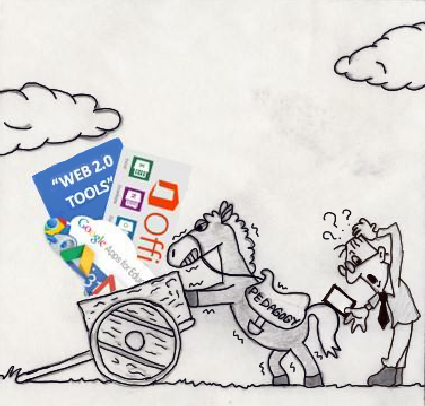
With every inch of progress we must constantly be reflective of where we are at and how to improve. We can ill afford to keep investing in the “stuff” through the played out scenario of putting the cart before the horse. Placing a device in the hands of all students and hoping for learning miracles to happen will always result in a let down.  I know this might rub technology aficionados the wrong way, but the fact remains that edtech has been over-promised and under delivered.  Any leader who has gone through a successful digital transformation realizes this.  The key is to be critical of the process in order to make sure investments pay off in terms of enhanced learner outcomes.  


Image credit: http://core0.staticworld.net/images/article/2015/08/cx-picture-100608993-primary.idge.jpg

Many lessons can be learned from successful digital transformations, including the one that occurred at my former school. Whether going Bring Your Own Device (BYOD), 1:1, blended, or personalized learning take note of some key elements that are essential to success:

Infrastructure

If the plumbing is not in place success will be hard to come by.  By infrastructure I am not talking about devices per say, but WiFi access and space design.  There is noting more frustrating for teachers and students alike when attempts are made to integrate technology with purpose only to have the WiFi not work or operate properly. Hand in hand with WiFi access is the capability to charge devices.  Make the initial investment to get this right the first time.

Framework 

Pedagogy trumps technology. Do you have a framework in place to ensure successful integration?  It is critical to have a common vision, language and expectations for how technology will play a ubiquitous role in supporting and/or enhancing learning.  A growing number of schools and districts rely on the SAMR model.  My question for you to consider is what does SAMR actually tell you or your stakeholders about the level of student learning taking place? We found the answer to be not very much. SAMR does provide good guidance on what to avoid when it comes to technology integration (substitution) and provides an excellent bridge to the Rigor Relevance Framework. Consider the Rigor Relevance Framework, which is learner centric, to assist in effectively aligning technology to instruction, curriculum, and space redesign. Check out this example in relation to Gsuite.

Professional Learning

Investing in people will always be one of the foundation elements of a successful digital transformation. Relevant, job-embedded learning opportunities that move away from traditional drive-by approaches will help to sustain meaningful change.  Equal investments need to be made to support both teachers and administrators. After all, success is dependent on both groups having the knowledge, support, and skills to implement, evaluate, and continuously improve the digital transformation process. There is no substitute for quality face-to-face professional learning opportunities that blend an assessment of where you stand with digital practices, courses, job-embedded coaching, and active discussion.  

Leadership

This element is critical in any type of change process.  It is not only about being open to change, but also being an intimate player in the process.  Thus, digital leadership goes without saying. It is about working smarter, not harder, in order to do what we already do better.  Digital leaders help to establish a collective vision, provide support, model expectations, ensure accountability, and constantly reflect in transparent ways in order to improve.  Technology is a ubiquitous component that supports the work they have always done but in a more effective and efficient manner.

Avoid Assumptions

Let’s begin with an example.  Students know how to use tech (assumption), but they don’t necessarily know how to use it to support their learning (reality). Students will be off task when they are afforded the opportunity to use technology (assumption), yet virtually all of us adults would go off task at times well before the digital age (reality).  So many assumptions are made when it comes to technology that reality plays second fiddle. Progress, and ultimately success, is contingent upon removing a myriad of barriers to change that arise as a result of our mindset. Assumptions and excuses will hold you back. Thanks to the Internet and Personal Learning Networks (PLN’s) we can learn firsthand from the reality inherent in digital transformation success across the globe.  

Evidence

Success breeds success.  There is no greater motivator than the positive results of any change effort. Evidence of success goes a long way towards embracing change resulting in transformation. However, along the same lines of our infatuation with assumptions, a lack of evidence and connection to research tends to be accepted when talking about digital transformations. When integrating technology there needs to be a Return on Instruction (ROI) that results in evidence of improved student learning outcomes. This can come in the form of data, improved observations/evaluations, artifacts, and portfolios. Too much money and time is at stake to just rely on broad claims and a lack of real evidence of success. 

Smart Budgeting 

Having developed a budget for a high school over the course of many years I can tell you that there was a great deal of wasted money year in and year out. Money can be freed up in any budget if we critically analyze how the expenditure will positively impact learning.  Once money is reallocated the next step is to ascertain the role that any technology purchase will play. The question we need to be asking when going through the budget process is how will this technology actually improve learning and achievement at scale?  If there is a challenge in answering this question then obviously you are not making a wise investment.  Do your research and plan accordingly.

Relationships

Relationships are the glue that holds the change process together resulting in transformation.  These need to be built both internally and externally.  From a student perspective it is important to emphasize and follow through in ways to foster greater student agency in the learning culture.  You need to begin to say yes more than no as implemented ideas that come from students are the ultimate relationship builder.  From an adult stakeholder perspective it is critical to develop a positive brand presence that will result from a multi-faceted approach to communications and an evolution into the storyteller-in-chief.  Meet your stakeholders where they are at, engage them in two-way communications, and maintain a level of consistency. Over time powerful relationships will be established with all.

All in all we need to prepare students for their future, not ours.  We can ill afford to prepare them for a world that doesn’t exist.  We need to create schools of the future, today.  Even with progress in many schools and districts it is important to always be open to critical reflection and evaluation on not just where we are at, but more importantly where we want to be.  

Sunday, July 31, 2016

Word Cloud Tools: Raising the Bar

Word clouds, or tag clouds as they are sometimes called, bring words to life in a visual way.  They constitute graphical representations of word frequency that give greater prominence to words that appear more often. These words can be taken from an analyzed text or added manually.  The more a word appears or is imputed, the larger it will be in the cloud. Best of all word cloud generators are easy to use and there are a variety of display features that can be used for aesthetic appeal.

For years word clouds have been fan favorites of teachers and administrators alike. These early web tools burst on the scene to provide new avenues to engage students and stakeholders.  Over the years these tools have been used to increase student engagement.  From a pedagogical sense they can be used as part of an anticipatory set or as a means to review prior learning, check for understanding, and close a lesson. They can also be used more broadly as part of a larger student project to assist with making their learning more visible.


Image credit: http://www.christoy.net/

Even though words clouds are used as a pedagogical strategy in class their true power lies in their ability to communicate ideas at a glance. They can be used to highlight successes and achievements as well as articulate how stakeholders feel about our schools and districts. There are many other benefits of using word clouds in general.  They are relatively easy to comprehend, can provide clarity on overreaching ideas, and are easy to share across digital networks. It is no wonder that these tools have been embraced in education and business.

Popular word cloud generators include Wordle and Tagxedo. Even though these are extremely popular there are some apparent downsides. Let’s analyze the description of Wordle:
Wordle is a toy for generating “word clouds” from text that you provide. The clouds give greater prominence to words that appear more frequently in the source text. You can tweak your clouds with different fonts, layouts, and color schemes. 
Herein lies the problem with tools like this. For starters they are openly referred to as toys. The second issue stems from the fact that the cloud itself is created in a relatively low-level way when it comes to thinking. All one has to do is input words and paste text to create a cloud. My issue with Wordle and Tagxedo is that little to no critical thought is aligned to what could be a powerful way to aid in conceptual mastery. This is not to say that word clouds can’t be used to support higher order thinking skills. The key here is to begin to look beyond traditional tools and begin to integrate those that allow students and stakeholders alike to respond to open ended questions.

Enter Mentimeter and AnswerGarden. Both tools can be used for formative assessment.  Responses to an open-ended question of your choice can be used to create a word cloud.  Each is simple to use and will only take minutes to set up. With Answer Garden all responses form a growing word cloud, which can be exported to Wordle or Tagxedo if you wish. You can even set up an administrator password to remove inappropriate responses. When setting up Mentimeter there are seven different question types to choose from, one of which is a means to have answers curated into a colorful word cloud. It even has a profanity filter. 

With all the tech tools integrated in schools we need to also be more mindful of the questions to which we ask our learners to respond. Let’s move away from the use of toys to support low-level learning and begin to integrate the power of word clouds to support high-level learning. 

Friday, January 22, 2016

5 Steps Toward Building Successful Digital Communities Infused With Rigor and Relevance

A dynamic combination of mindset, behaviors, and skills is required for schools to become places where social media and digital tools are integral and beneficial parts of a rigorous program and where they work symbiotically with active, engaged, and applicable learning. 
How can we take the greatest advantage of this moment in time and create compelling and challenging learning spaces for students? 


Image credit: https://etsmagazine.files.wordpress.com/

The most important things to do are to give up control and to trust students and their teachers to use real-world tools to unleash creativity and a passion for learning. After putting these tenets in the foundation, the specifics can take several different forms: 


Step 1

Realize that social media is a predominant tool in the world. It fosters personalization, creativity, and collaboration, giving students infinite ways in which to create artifacts of their learning and knowledge. 


Step 2

If 1:1 is not in the cards make use of devices students already have, know, and use. Bring Your Own Device (BYOD) signals to kids that teachers know and understand their basic makeup. 
Employing the energy surrounding personal devices allows them to use the tools that help them do what they do better. BYOD enhances learning, increases productivity, allows students to grow their research skills, and gives teachers the chance to teach appropriate digital responsibility. 

Step 3

Create spaces for making, collaborating, and tinkering. Give students chances to build and create using real-world tools (wood shop, electronics, metal work, and coding stations) and to solve open-ended, real-world problems. Bring play back into the picture. These spaces provide students with challenging problems to solve where there is no one correct solution. Through self- directed learning, students are driven to find solutions to create a product that has value. 

Step 4

Structure schools so that they more accurately reflect the real world. Ubiquitous connectivity, charging stations, and casual zones that promote conversation and play increase students’ sense of belonging and engagement. Digitally astute students engage through such models as blended learning, flipped classrooms, games, makerspaces, and virtual learning

Step 5

Give students access to open courseware and open source technology. Inherent in these approaches is a high level of personalization and choice about what to focus on, which in turn leads to greater ownership over learning and personalized ways to demonstrate understanding. 

Ambitious, successful teaching and learning have become inherently intertwined with the digital world. Educators must be able to develop and enact rigorous, relevant instructional methods and formats while using digital tools effectively to underpin their instruction. Students and teachers can transform learning so that it not only prepares them to excel in academic life, but also endows them with essential digital age skills. 

Sunday, December 13, 2015

What Matters Most

“Forcing teachers and students to use tech because you have it will never get the results you want. Integrate when appropriate.” – Eric Sheninger

I love technology. Now, most of you are not shocked by that statement so let me explain it with some more detail.  I love technology for its ability to transform lives and professional practice.  The formation of a Personal Learning Network (PLN) has opened my eyes and mind to an array of ideas, strategies, and tools to support and enhance learning through the assistance of technology.  Society, the landscape in our schools, and the learners who we serve continue to change as our digital world evolves. This not only presents a fantastic opportunity to implement transformative practices, but it also represents a distinct call for action.

The possibilities are quite endless, but the wrong focus can and will result in disaster. Forcing students and educators to use technology just for the sake of using it will never transform teaching and learning. There are no quick fixes for the many prevalent issues in our education system. Viewing technology as a silver bullet or cure is misguided at best.  As I continue to watch districts, schools, and classrooms infuse technology at a surface level, in most cases, I am seeing no distinct changes in teaching, learning, and leadership. This is what matters most. 


As adult learners there should be an emphasis on improving instructional design and pedagogical techniques that will develop students into critical thinkers and problem solvers.  There is also a glaring need to create better means to assess and provide feedback to students as to whether or not they are meeting the higher standards that educators are now tasked with addressing.  The key to learning success resides in always focusing on building a strong instructional foundation.

With this in mind, technology does not become an add-on or gimmick just to engage students. Its role becomes integral to the instructional process through support and enhancement of learning outcomes aligned with more rigorous standards.  Technology in itself promises nothing. It is what you and your students do with technology aligned to sound pedagogy that will make all the difference. In the end technology initiatives will either flourish or flounder. The outcome is in your hands. Lessons, projects, initiatives, and culture should never be built around technology. Focus on learning first and foremost and the possibilities of technology are endless. That’s what matters most.  This is, after all, the primary role of education. 

Sunday, July 19, 2015

Be Wary of Putting the Cart Before the Horse

"Unless you get instructional design right, technology can only increase the speed and certainty of failure" - William Horton

As budgets expand or money becomes available at the end of a school year, the knee jerk reaction of many schools is to go all in and spend it as quickly as possible.  With advances in affordable technology, such as the ultra-cheap Chromebook, it has been tough for schools to resist spending these funds on devices.  Now don't get me wrong, I am all for schools increasing student and staff access to quality technology. However, the cart before the horse scenario has played out in so many schools across the globe. The end result has been a massive influx in tools, but a clear lack of vision and planning as to how these powerful tools can, and will, actually impact learning. In some cases, the technology resides unused in classrooms and schools due to the cart before the horse approach. There is nothing transformational about this.


Image credit: Eric Patnoudes

There are many technology frameworks out there for schools to refer to such as SAMR, TPACK, and the TIM. The SAMR Model has provided us with a good lens to observe firsthand the need for proper planning prior to investing large amounts of money on technology.  This by no means is a perfect framework to guide the effective implementation of technology initiatives, but it does give us a good idea of what should not be taking place.  I have visited one too many schools where I have seen time and time again devices being used in ways that serve as a direct substitute for the same ineffective practices that we are trying to move away from. Technology in itself will never transform teaching and learning. Students, teachers, and leaders who effectively integrate technology with purpose aligned to learning and leadership outcomes will.

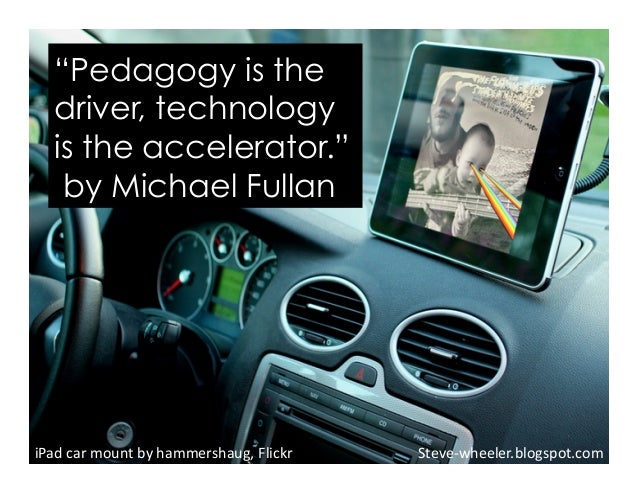
The quote at the beginning of this post from William Horton provides an important reminder of the critical need for teachers to be supported in proper instructional design prior to any massive technology roll out. We found great success at my school during our digital conversion by focusing on a pedagogy first, technology second if appropriate mindset.  Not only was there a focus on solid instruction, but we also provided numerous supports for our teachers in the form of ongoing and job-embedded professional learning opportunities. If the expectation was to integrate technology with purpose to support and/or enhance learning we made sure everyone was prepared to do just that. As Michael Fullan has stated, pedagogy is the driver and technology the accelerator. 


Image credit: Shelly Terrell

It is not just teachers that need work on instructional design when it comes to effectively integrating technology. The same goes for school leaders who also deserve support in the form of professional learning so that they can properly observe and provide valuable feedback to teachers when technology is being integrated into lessons. Ultimately it is a leader’s overall responsibility to make sure technology purposes are having an impact on learning. Thus it is wise to put them in a better position to do just that.

The critical need for learning doesn't stop with teachers and leaders. It also extends to students and parents. As learning changes with successful technology integration and students begin to have more access to technology, a golden opportunity arises to not only address critical digital literacies, but also responsibility. When rolling out either Bring Your Own Device (BYOD) or 1:1 initiative create programs to prepare students for the purposeful use of technology to support their learning. In the end, this will mitigate many issues before they arise. At my school, I met with all the students in large-scale assemblies to educate and reinforce the role of mobile learning devices at the beginning of the school year. Having parent programs in place is also vital to the success of any major technology initiative. With large scale purchases, they will want to know the impact on learning and others will need guidance on the how teaching and learning are now changing.

The importance of getting instructional design right cannot be stressed enough. Don't fall victim to the cart before the horse scenario. If you or your school has the ability and funds to purchase technology, don't rush to get it into the hands of staff and students. Take the time to develop a shared vision and plan for integration that aligns with sound pedagogy, using a tool such as the Rigor Relevance Framework, which is much more robust than the other options mentioned earlier in this post. Reflect on instructional design within the context of student agency and higher-order thinking skills first. Provide professional learning opportunities before, during, and consistently after the roll out.  After a focus on instructional design, work with students and parents to build broader support. In the end, this will help to not only make the implementation process easier but also to have your technology initiatives primed to get results.


Sunday, March 8, 2015

Engagement Does Not Always Equate to Learning

No matter where I am, whether it is a physical location or virtual, I am always hearing conversations about how technology can be used to effectively engage students.  This is extremely important as the majority of students spend six to eight hours a day in schools where they are completely disengaged. I for one can’t blame today’s learner for being bored in school when I all have to do is observe my own son at home playing Minecraft to see firsthand his high level of engagement.  His Minecraft experiences provide meaning and relevance in an environment that is intellectually stimulating but more importantly fun. Schools and educators would be wise to take cues from the real world and make concerted efforts to integrate technology with the purpose to increase student engagement. Engagement, after all, is the impetus for learning in my opinion.


Let’s take a closer look at defining what engagement really means from the Glossary of Education Reform:
"In education, student engagement refers to the degree of attention, curiosity, interest, optimism, and passion that students show when they are learning or being taught, which extends to the level of motivation they have to learn and progress in their education. Generally speaking, the concept of “student engagement” is predicated on the belief that learning improves when students are inquisitive, interested, or inspired, and that learning tends to suffer when students are bored, dispassionate, disaffected, or otherwise “disengaged.” Stronger student engagement or improved student engagement are common instructional objectives expressed by educators." 
The last line in the description above elicits a great deal of concern for me.  With or without technology, there always seems to be a great deal of emphasis on student engagement, but the fact of the matter is that engagement does not necessarily equate to learning.  I have observed numerous lessons where students were obviously engaged through the integration of technology, but there was no clear indication that students were learning.  Having fun, collaborating, communicating, and being creative are all very important elements that should be embedded elements of pedagogically-sound lessons, but we must not lose sight of the importance of the connection to, and evidence of, learning. Thus, students can walk away from a lesson or activity having been very engaged, but still walk away with very little in the form of new knowledge construction, conceptual mastery, or evidence of applied skills. When speaking at events I often ask leaders and teachers how they measure the impact of technology on learning. More often than not I receive blank stares or an open admission that they have no idea. The allure of engagement can be blinding as well as misleading.

It is so important to look beyond just student engagement when it comes to technology. If the emphasis is on digital learning we must not get caught up in the bells and whistles or smoke and mirrors that are commonly associated with the digital aspect alone. Engagement should always translate into deeper learning opportunities where technology provides students the means to think critically and solve problems while demonstrating what they know and can do in a variety of ways. Technology should be implemented to increase engagement, but that engagement must lead to support, enhancement, or an increase in student learning. It should not be used as a digital pacifier or gimmick to get students to be active participants in class. With technology there should be a focus on active learning where students are doing.

Here are some questions that will assist in determining if engagement is leading to actual learning:
  • Is the technology being integrated in a purposeful way grounded in sound pedagogy?
  • What are the learning objectives/outcomes?
  • Are students demonstrating the construction of new knowledge? Are they creating a learning product/artifact?
  • How are students applying essential skills they have acquired to demonstrate conceptual mastery? 
  • What assessments (formative, summative) are being used to determine standard attainment?
  • How are students being provided feedback as to their progress towards the specific learning objectives/outcomes?
  • Is there alignment to current observation/evaluation tools?
Engagement, relevance, and fun are great, but make sure there is observable evidence that students are learning when integrating technology. N

Sunday, March 1, 2015

Digital Learning Prospers With the Right Culture

As of late, I have been doing a great deal of work with schools and districts on how to effectively implement digital learning across the curriculum. When it comes to technology in general, the overall goal is to support learning, not drive instruction. Where digital learning initiatives miss the point is a focus on how technology actually accomplishes this.  Schools invest billions of dollars to purchase technology with no real thought as to how it is actually impacting learning.  When I routinely ask school leaders how they determine or measure the impact of their technology on student learning, I get blank stares or open declarations that they have no idea. This is a problem. 

The right culture focuses on technology as a tool to enhance learning in a variety of ways.  When technology is integrated with purpose, students can create artifacts to demonstrate conceptual mastery, apply an array of acquired skills, illustrate the construction of new knowledge, and be empowered to take ownership of their learning.  It can also increase relevance and make the curriculum more contextual.  This is just a sample of how digital learning can complement the work that is already taking place in schools while allowing students to clearly see the value in their learning.   As with any holistic initiative, the key is sustainability and a resulting change that sees all aspects of digital learning become an embedded component of school culture.  Without the right culture in place for digital learning to be embraced and thrive, there will only be isolated pockets of excellence.  


The following are some suggestions on how to ensure digital learning initiatives in your district or school don’t fall flat:
  • Build a shared vision – This important aspect is notably absent in many digital learning initiatives.  Efforts must be made to developing a shared vision with a variety of stakeholder input, including students.  This is vital if the goal is sustained, cross-curricular application on a routine basis.  The vision should be established in a way that clearly articulates how technology will be used to support/enhance student learning.
  • Develop a strategic plan backed by action – Begin to form a plan for digital learning using some essential questions that add perspective for the change: Why is this change needed? How will it be implemented? What resources are needed? How will we monitor progress and evaluate it on a consistent basis? What other challenges have to be overcome? By focusing on these questions and others that you develop, a concrete plan for action can be created.
  • Access matters – During the planning process, it is imperative that there is a critical analysis of existing infrastructure.  There is nothing more frustrating to teachers and students when an activity incorporating technology fails because of poor WiFi connectivity.  In addition to WiFi, it is important to ensure there are enough devices and associated software if the goal is integration across the curriculum.  To increase access give some thought to a Bring Your Own Device (BYOD) initiative if there is not enough funding to go 1:1.  An audit of available resources during the planning process would be a wise idea.
  • Ensure ongoing professional development – I cannot overstate the importance of this suggestion enough.  Teachers need training on how to develop pedagogically sound lessons and quality assessments aligned to higher standards.  They also need to be exposed to a variety of tools and ways that they can be seamlessly integrated to support specified learning outcomes. School leaders need professional learning opportunities that assist them to effectively observe and evaluate digital learning in classrooms.   Professional development should be ongoing and embedded throughout the school year.
  • Monitor with intent – The vision and planning process provides the focus, but consistent monitoring helps to ensure sustainable change leading to transformation.  School leaders need to consistently monitor and provide feedback on digital learning activities through observations, evaluations, walkthroughs, and collecting artifacts.  
  • Provide support – Throughout the initial implementation stages, and well after the initiative gains steam, ongoing support needs to be provided. Support comes in many ways such as empowering teachers to be innovative through autonomy, giving up control, being flexible, and encouraging risk-taking. Budget allocations will also have to be made each year to not only sustain current digital learning initiatives but to also move forward. 
  • Model the way – To put it simply, don’t expect others to do what you will not. Attempt to model at a basic level the expectations that you have when it comes to digital learning. Don’t be afraid to roll up your sleeves and work alongside your colleagues. 
  • Honor student voice and choice – Digital learning initiatives are all about creating schools that work for students.  When developing lessons allow students to decide which digital tools they want to use to show you what they have learned.  The key is being able to assess learning, not knowing how to use thousands of tools.  Put students in the driver’s seat when it comes to allowing them to determine the right tool for the right task.  Also, encourage them to consistently provide input to improve digital learning initiatives.
The whole premise of digital learning is to increase relevance, add context, acquire then apply essential skills, construct new knowledge, and enhance critical literacies. Regardless of what standards you are accountable for digital learning can be integrated seamlessly to foster deeper learning. Education today should not prepare students for a world that no longer exists.  It is time to not just prepare students for college and careers, but also life in an ever-increasing digital world.

Sunday, February 1, 2015

Getting Digital Tools On Your Side: 4 Steps

This is the second post as part of an adapted article I co-authored, Real-World Ready: Leveraging Digital Tools

A few weeks back I shared ways that digital tools can improve teaching and learning.  It goes without saying that the most important aspect of digital leadership is enhancing student learning while increasing achievement. Technology needs to be integrated with purpose in ways that support learning as opposed to driving instruction.  A good rule to follow is pedagogy first, technology second when appropriate. Using technology just for the sake of it is an ineffective practice.  Effective digital leaders understand this and through the observation and evaluation of instruction ensure that digital tools align to learning outcomes and are having an impact on student learning.


Image credit: http://www.robeson.k12.nc.us/cms/lib6/NC01000307/Centricity/Domain/4057/Blooms_Circle.png

The main driver of successful, effective teaching originates from educators who are scaffolding learning in relevant and strong ways. A grounding in the Rigor/Relevance Framework -- an action-oriented continuum that describes putting knowledge to use -- gives teachers a method for charting learning. This framework is based on traditional elements of education yet encourages movement from acquisition of knowledge to application of knowledge. Although digital tools themselves are no substitute for a clear framework, they can underpin it. No matter what digital tool is considered, introduced, or integrated into the classroom, capable teacher presence and teacher-centered instruction always belongs in the foreground.


How can you, as a school leader, take your understanding of the strengths behind some digital tools and create pathways for rigorous and relevant use of digital tools? Use the following best practices when assessing digital tools and their use in your school:

Prioritize Instructional Excellence: Technology can be an effective tool but it remains just that -- a tool. Educators provide the backbone of the student’s learning experience. A teacher should always have concrete answers to these questions:
  • What capabilities do I want my students to develop? In what specific ways is my instructional design rigorous and relevant? 
  • What are my benchmarks for rigor? relevance? relationships? creativity? inquiry? 
Armed with responses to these questions, a teacher can then go on to consider a specific digital tool, asking:
  • How does this digital tool provide a way towards full development of the capability I want to develop in my students? 
  • Is my teaching, using this tool, still just as structured, rigorous, and relevant as it would be without this tool? 
Identify Student Needs Around Use of Digital Tools: Information should not be confused with knowledge in evaluating digital tools. Knowledge is the recall of information, discovery, observation, or naming. Teachers should be able to define what knowledge (not information) students will need to apply when using a digital tool.

Create a Game Plan for Managing Student Use of Online Tools:  It takes work and careful planning to implement the use of digital tools in defined ways. Before introducing a digital tool into a learning context, teachers should understand:
  • How he/she will be able to support students in using a tool that might be unfamiliar
  • How each student will be able to manage it independently 
  • How he/she will take advantage of students’ diversity and inclination towards building community online 
  • How students and instructor will connect across sometimes great distance
Maximize Opportunities for Diverse Forms of Feedback:  Rather than relying on feedback or evaluation models suited to older models of assignments, have teachers ask:
  • How will this online tool allow me to hone in on each student’s thought process and provide targeted, formative feedback that can be immediately and usefully applied? 
  • How can my feedback help pave the way for next steps in learning and in reaching established, articulated, or modeled goals?
Educational landscape and digital landscape have become inherently intertwined. Learners are teachers alike are enmeshed in digital life and need effective, specific ways to best use digital tools in rigorous and relevant ways. Educators must be able to develop and enact rigorous, relevant instructional methods and formats, while learning about and using effective digital tools to underpin their instruction. As long as educators are clear about the learning objectives, digital tools can be a powerful supporting tool.