Showing posts with label BYOD. Show all posts

Sunday, February 10, 2019

Are Students Off-Task in Class on Phones? There's an App for That!

As teachers and administrators, grappling with off-task behaviors and distractions when it comes to student phones in the classroom has occurred at some point. Recently I recently learned about Pocket Points, an app that educators are using to promote better decision-making amongst students with the goal of keeping them off their phones when not being used to achieve learning outcomes associated with the class. More on this in a little bit. 

I am a huge proponent of harnessing and leveraging mobile technology in the classroom. As the principal, I decided to implement Bring Your Own Device back in 2010 as a way to not only take advantage of student-owned devices but to also improve the learning culture through more empowerment and ownership.  In Uncommon Learning, I detailed the necessary steps we took to ensure success. The key, whether 1:1 or BYOD, is to thoroughly plan and put learning at the forefront for kids, teachers, and administrators.  

However, planning can only get you so far. Building pedagogical capacity both with and without technology must be prioritized.  Mobile technology is more accessible than it has ever been. The urge to go on a personal device in schools, with and without mobile learning initiatives, has grown exponentially.  Up until recently, there have been two main deterrents:
  1. Well-designed lessons that are relevant to kids combined with sound classroom management
  2. A school culture that empowers kids to use their devices responsibly
Now the above strategies might still work well, but in my experience working in schools as a job-embedded coach, I have seen more and more students off-task. No matter how well we plan or work to develop a positive school culture, off-task behavior still occurs. Enter a third deterrent mentioned at the beginning of this post called Pocket Points. 

Pocket Points was founded in 2014 by two college students who noticed a disturbing trend among their classmates in that too many kids were spending class glued to their phones, ignoring their professors' best attempts to teach them. They had the idea to create an app that would reward students for paying attention in class. They got local businesses to agree to offer free and discounted food as rewards on Pocket Points, and it spread through the campus like wildfire. Within a few weeks, half of the student body was using the app. 


The developers spent the next few years spreading Pocket Points to every college in the country as well as high schools. Through their growth, they came to the realization that the problem was even more prevalent at the high school level than college, and these teachers felt the impact more than anyone. As a result, a Teacher Rewards program was developed. This program allows teachers to directly offer rewards to their students on Pocket Points for staying focused in class. The hope is that it will act as a support tool that teachers can use to help their students develop healthy phone habits while maintaining engagement on learning tasks in the classroom. In the near future teachers will have the ability to "whitelist" certain educational apps, meaning students could continue to earn rewards while using these as part of the learning process. This should help teachers who integrate phones as educational tools keep their students on task.

Getting started is easy. Students can download the Pocket Points app for free from the app store. They sign up, select their school, and they can begin earning rewards. Here they will find a gift page on the app full of rewards provided by companies, including Redbox, Panda Express, and Papa Johns on the national level. There's a variety of online companies that are available to all students as well. In many areas, partnerships with local restaurants and retailers provide even more rewards, all of which cost points.

Points can be earned in a variety of ways. Initially, they could only be earned when a student had his or her phone out of sight when not being used as part of the teaching and learning process. Now kids can earn points when they are not in school, though they need to set and successfully complete a time off phone goal to get the points. There is also a great feature where the app automatically tracks when a student is driving and gives points if he or she remains undistracted.

Schools and teachers can leverage this app to provide positive reinforcement while combatting the issue of off-task cell phone behaviors, which cause a distraction in the classroom. This issue has become pervasive in many cases while frustrating teachers and administrators alike. It's a battle that most are tired of fighting. 

Empowering kids to use devices as tools to support and enhance their learning is, and always will be, the goal. However, balance is critical, and technology will not improve every lesson or task. In either case, Pocket Points might be an option to help overcome battles with phones to create a school culture that sets up students for success now and in the future. 

Sunday, July 8, 2018

A Practical Way to Increase Access to Mobile Technology Regardless of Age

More and more schools are either installing or improving WiFi networks in schools. We still have a long way to go in many places, but the increase in access provides kids with an array of innovative learning opportunities that continue to evolve.  With a pedagogy first, technology second if appropriate, approach to instructional design, educators can begin to support and enhance lessons with an array of tools. Sites like Common Sense Education and edshelf make it easy to find the right alignment to the right instructional strategy.  However, if a well-designed assessment is in place, then the natural course of action is to allow learners to select the best tool for the task. 

Even though the cost of mobile devices has gone down, considerable purchasing challenges persist. With that being said I do want to share a pretty cool and practical idea I stumbled upon during one of my coaching visits with Wells Elementary School.  As I was conducting some learning walks with the admin team I noticed some kindergarten students in Deborah Weckerly’s class engaged in blended learning activities using smartphones. As a successful Bring Your Own Technology (BYOT) campus, I wouldn’t have been surprised if in fact some of the students were learning with devices that they had brought in from home. Knowing though that it is never safe to assume, I asked Deborah if the kids were using their own devices. She laughed and said no in a way that affirmed the apparent observation that these students were kindergarteners. I was then left wondering why I even assumed that they might have brought devices to school.

Since the kids weren’t bringing in the devices, I inquired as to how they made it into the classroom. Deborah then showed me a basket that had at least five devices in it at the time but held a total of eight or so when full. She then explained that over the years she had asked her family and friends to donate older smartphones for use in her class instead of trading them in for cash or towards an upgrade.  I thought this was a genius idea!  She now had enough devices connected to the district’s secure WiFi network to support individual or station-rotation blended learning. 


For many learning activities, it’s not the device that matters but instead what learners can do with access to an array of interactives accessible on the Web. I can relate to this as well.  As my wife was preparing to upgrade her iPhone, she asked me if I wanted to as well. I thought about this briefly until settling on just inheriting her older 6 Plus. For what I use my smartphone for all I needed was a right amount of storage and the ability to access the Internet for the few apps that I depend on regularly. 

Innovative educators like Deborah Weckerly are always looking for ways to improve the learning experience for kids.  Regardless of your position, think about reaching out to your family and friends to acquire mobile devices before they are ready to upgrade.  These tools can then be used as part of pedagogically sound blended learning or used to support BYOT initiatives where students forget to bring their device or do not have one of their own. In the end, it is essential to always look for ways to improve access and ensure equity so that all learners are provided with a relevant and challenging learning experience. 

For more mobile learning resources check out this Pinterest board. 

Sunday, July 3, 2016

Asking the Right Questions About Mobile Learning

As of late, I have been engaged in a great amount of work, either assisting districts and schools as they begin to implement mobile learning (1:1, BYOD) or helping them get their programs on track.  Over six and a half years ago, I helped successfully implement a Bring Your Own Device initiative in my school. Not only were we the first to do it in my state, but there weren't many great examples to pull from at the time.  Thus, many lessons were learned the hard way. It is important to remember that change has to be treated like a process as opposed to one single event. The success of mobile learning relies on proper planning, reflection, and evaluation to improve. 

The key to successfully implementing sustainable change begins with asking the right question(s). Below are some questions to help you ascertain where you are, but more importantly, where you want to be with either 1:1 or BYOD. 
  • Is your infrastructure ready? Has an infrastructure audit been completed?
  • Have you developed a shared vision that takes into account staff, student, and community input? For success, all stakeholders must be on board and have clear outcomes developed.
  • Have you developed a strategic plan to ensure the initiative will positively impact student learning? How will you measure success and evaluate effectiveness? Has curriculum been updated and other resources explored?
  • Have you created policies that protect students and staff while promoting creativity?
  • Has staff been trained in digital pedagogy (lesson/project design, assessment, etc.)? Do they possess the confidence to integrate the devices with purpose to support/enhance learning? Have administrators been trained on digital pedagogical techniques in order to provide valuable feedback to staff? Have fears and challenges been addressed? How will equity be ensured in a BYOD environment? What will you do if students forget their devices, don’t have them, or have no access to WiFi outside of school?
  • Has a plan been developed to train students? What will be done to educate parents?
  • How will you build community support?
  • What evidence will be provided to the BOE and community that the initiative is a success?
Determine where you want to be and how you are going to get there with your mobile initiative. Once you have answers to the previous questions, reflect on the drivers of a successful mobile learning initiative to ensure that the stage is set for improved student learning outcomes. 


Sunday, December 6, 2015

Implementing Mobile Devices With a Focus on Learning

The following post is a modified excerpt from Uncommon Learning.

“Mobile learning provides enhanced collaboration among learners, access to information, and a deeper contextualization of learning. Hypothetically, effective mobile learning can empower learners by enabling them to better assess and select relevant information, redefine their goals, and reconsider their understanding of concepts within a shifting and growing frame of reference (the information context).” — Marguerite L. Koole (2009) 

No one will deny the impact that mobile is having on the world.  All one has to do is take a look at how mobile devices are changing everyone’s perception of computing as it is more accessible and personal than ever. Over the years I have written extensively on the topic, including a chapter in my new book Uncommon Learning.  As a principal I quickly saw the potential in mobile learning and as a result our school became the first to embrace Bring Your Own Device (BYOD) back in 2010. 

Mobile devices offer a new and exciting avenue to engage students and promote learning while increasing academic achievement. Research by Cristol and Gimbert (2013) found that students utilizing mobile learning devices scored, on average, 52.34 points higher on the state assessments than their peers who did not use them. Students are more connected than ever with their devices, and it is necessary for teachers to capitalize on this opportunity to drive student learning and outcomes.  With any initiative, especially BYOD or 1:1, the focus has to be on learning. 

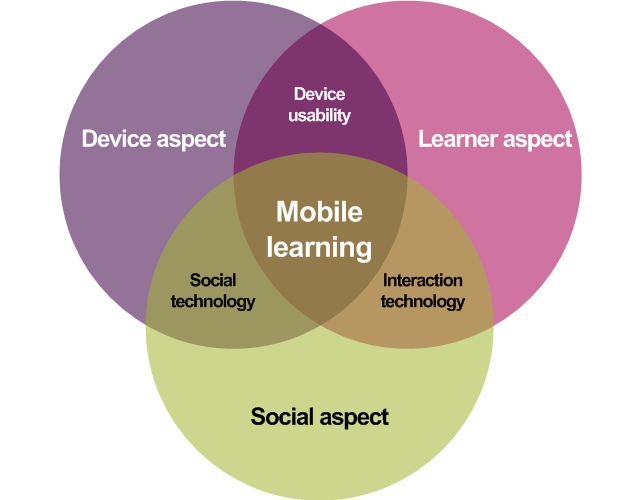
Koole’s (2009) Framework for the Rational Analysis of Mobile Education (FRAME) model provides a more holistic framework for mobile learning. In this framework, mobile learning is a combination of the interactions among learners, their devices, and other people. Koole provides a useful checklist that schools and educators can refer to when looking to integrate mobile learning effectively as part of a BYOD or 1:1 initiative. 


Image credit: https://mobilelearninginfokit.pbworks.com/f/1314179784/frame-venn-i1.png

Have you considered the following in your mobile learning ecosystem? 

  1. How use of mobile devices might change the process of interactions among learners, communities, and systems 

  2. How learners may most effectively use mobile access to other learners, systems, and devices to recognize and evaluate information and processes to achieve their goals 

  3. How learners can become more independent in navigating through and filtering information; how to prepare them for that change 

Be aware of the many pitfalls that are associated with educational technology. Access alone will not translate into enhanced student learning outcomes.  At the International Center for Leadership in Education (ICLE) my team and I work with schools and districts to get mobile learning initiatives right before an all out rollout. It is critical to plan well ahead of any major BYOD or 1:1 initiative at least a year in advance to ensure that all the necessary elements are in place to support student learning. These elements are listed below, but I encourage you to read this post that provides more detail on each:

  • Infrastructure
  • Shared Vision
  • Strategic Plan
  • Policy Development
  • Professional Development
  • Student/Parent Programs
  • Budget Allocations

I encourage you to take a critical look at the mobile learning initiatives in your district and determine what can be done to improve them. In education there is no such thing as perfection and as such we must always look for opportunities to improve existing initiatives, not just new ones to be implemented. 

Cristol, D., & Gimbert, B. (2013). Academic achievement in BYOD classrooms. Proceedings from QScience 12th World     
          Conference on Mobile and Contextual Learning. mLearn, 15.

Koole, M. L. (2009). A model for framing mobile learning. In M. Ally (Ed.), Mobile learning: Transforming the delivery of 
          education and training (pp. 25–47). Edmonton, AB: Athabasca University Press.

Sunday, October 25, 2015

It's Not a Technology Issue

Technology still gets a bad rap in many education circles. Perception and lack of information influence the decision making process.  This ends up resulting in the formation of rules and policies that severely restrict or prohibit student use of mobile technology and social media as tools to support and/or enhance learning. Even with the proliferation of technology across all facets of society, we still see schools moving at a snail’s pace (if at all) to adapt, or better yet evolve, to a digital world.  In my opinion, sheer ignorance is to blame. From this ignorance a plethora of excuses arise. Educators and administrators are quick to point to technology as the main culprit for an array of issues. 

Case in point.  Over the summer I was working with a couple hundred school leaders on digital leadership. As the presentation began to focus on mobile learning initiatives a hand immediately went up. In a polite tone the school leader expressed his apprehension with allowing students to bring or use their own devices in school.  His main fear was a concern that students would be constantly off task texting or checking their social media accounts.  I paused for a moment to decide on an appropriate response.  Herein lies some irony. For the majority of my presentation this school leader had been disengaged himself with his technology.  As the majority of the group intently listed or participated in planned activities to apply what had been learned this individual and his buddies checked their email, surfed the web, and accessed their own social media sites.

The off-task behavior in the example above was glaring. I seized the opportunity to not only call the group out tactfully and with respect, but to also hammer home a few points. Adults can be just as bad, if not worse, than our students when it comes to technology. How can we as adults set expectations for device use for kids if we ourselves are not willing to abide by those same expectations?  This is quite hypocritical don’t you think?  Change in mindset hinges on our ability to challenge certain assumptions that we have in terms of mobile technologies.  When we do, the end result is that every one of us has been guilty of the same types of behaviors that students are chastised for. 

Stay with me on this as we take a walk down memory lane.  I want you to think back to your days as a student before the proliferation of mobile technology. Through a series of questions I am going to not only ask you to reflect on what you did, but also in the process challenge some firmly entrenched assumptions regarding technology. Here we go!
  • Did you ever write a note and pass it? Today’s students text or communicate via social media.
  • Were you ever so bored in class that you doodled or daydreamed? Well, now kids check their social media accounts or use apps to engage themselves.
  • Did any of you ever see someone with a cheat sheet or answers written on their hand? Now I know as educators you never did this, but I think you get my point. Obviously kids can use technology to do this now as well.
  • Did you ever break any school rules that you didn't agree with? Students do this all the time when dictator-like policies and rules govern technology use.
The point here is that it is not a technology issue, but many people make it one. The behavior argument that many make is flawed. It is first and foremost a school culture issue, which falls on the shoulders of leaders. Schools and districts that have embraced technology through a shared vision and resulting plan focused on learning reinforce appropriate use. The other issue is a classroom management one.  It goes without saying that if lessons are not authentically engaging and there is a lack of monitoring, students will at times go off task. With any learning activity, with or without technology, effective pedagogy is key.

The process of effectively integrating devices begins with our ability to model appropriate use while reinforcing student expectations for the role of mobile devices.  Make sure the essential elements are in place to ensure that devices afford students the opportunity to:
  • Support and/or enhance their learning
  • Conduct better research
  • Improve personal productivity
  • Develop and model digital responsibility and citizenship
  • Acquire and apply critical digital literacies

Image credit: http://www.educatorstechnology.com/2013/04/the-modern-taxonomy-wheel.html

It is time to not only perform the job that we signed up for, educating kids, but also do so in a way that prepares them to harness the learning power of mobile technologies. Excuses plague education systems around the world. Stop making it about the adults and focus on what’s best for learners today. 

Sunday, February 15, 2015

Tips for BYOD Equity

Bring Your Own Device (BYOD) initiatives are being adopted by districts and schools around the globe.  With the growing access that students now have to technology at home, educators are seizing this opportunity to increase access in the classroom.  For cash strapped districts BYOD seems like the logical solution to leverage the mobile devices students have to enhance learning, increase productivity, conduct better research, address critical digital literacies, and teach digital responsibility.  In theory this all sounds fantastic and there are many benefits that I have witnessed firsthand after successfully implementing a BYOD initiative over five years ago at my high school. However, in practice it is important to ensure that any initiative involving student-owned devices is well thought out with a resulting plan for action focused on student learning. For more information on how to implement a successful BYOD initiative make sure all of these drivers are firmly in place.

One issue that comes up frequently with BYOD initiatives is equity. The equity issue either haunts those who have or are in the process of going BYOD.  There are other times, however, that this issue stops the initiative from moving forward.  In any case the ones who suffer are our students.  In today’s digital age, who are we to tell a student that he or she cannot bring their tools to class to support learning? Don’t get me wrong; equity is a real issue that needs to be addressed when rolling out or sustaining any BYOD initiative.  It is our job as leaders and educators to provide the best possible learning environment for out students.  With this being said the equity issue should not be seen as an obstacle or challenge that cannot be overcome. Instead of using this as an excuse, or allowing the naysayers to use this as ammunition to derail the initiative, it is our job to find applicable solutions in order to create schools that work for today’s learners.  After all, it is not about our (adult) learning, but our students.


Image credit: www.securedgenetwork.com

In my community where we made the decision to roll out BYOD many years ago, we did so knowing full well that all of our students did not own a device. Through our planning we also discovered that some students had parents/guardians who would not allow them to bring them to school for fear of theft or breakage. Then there was a small group of students who flat out told us that they had no interest in using their technology in school to support learning. All of these challenges could have been excuses not to move forward, but we decided to find some solutions to benefit the majority while not excluding any student.

Any successful BYOD initiative should focus squarely on how students can use mobile devices to support their learning.  If a lesson called for every student to use a device to demonstrate conceptual mastery aligned to a specific learning outcome it was our job to ensure this.  Here are some practical tips that we utilized to ensure BYOD equity:
  1. Know Your Students – Once a decision has been made to implement BYOD in your school/district and proper professional development has been provided find out who are the haves and have nots.  One suggestion is to use Google Forms to curate this information.  Going forward this will allow you to focus on those students who need access.
  2. Advance Planning – Notify students the day before that they will need to bring their device to class the following day if the learning activity calls for it. 
  3. Supplement School Technology – If a learning activity calls for every student to have a device then it is imperative that supports are put in place. Students will either forget to bring their device, not have one, or chose not to bring it into school. A successful BYOD initiative has ample technology on hand to make sure all students have access to tools. 
  4. Utilize Cooperative Learning – This archaic pedagogical technique is a necessity in a BYOD environment. There will be some cases where supplemental school technology is not available. Developing lessons where collaborative groups are established and all students have equitable access to a mobile device to accomplish the learning outcome is a sound practice.
  5. Engage Parents - Prior to going BYOD parent meetings should be planned and held to discuss the initiative as well as outcomes and expectations. These conversations should also clearly outline how the issue of equity will be handled.  
Device envy is another issue that is commonly referenced by BYOD critics as a reason for not implementing BYOD.  As children we all experienced some sort of envious situation in school.  For me personally it is when I wanted Air Jordan sneakers and my parents bought me Converse. Sure, it didn’t make me feel good, but I learned to deal with it.  Part of preparing our students for life is helping them to deal with envy in positive ways.  As educators the last thing we want to do is make students feel bad about the type of device he/she has, but we also don’t want to use this excuse to exclude the potential of mobile learning.  The best way to avoid any envious situation is to keep the focus on learning. Not only did we do this, but we also began signing out school owned technology to students who did not have access at all.  When it was all said and done we never received one complaint from our parents on the equity or envy issues.

So what are your thoughts on the equity issue? Would you add any tips that I might have missed?  For more BYOD resources visit this Pinterest board.

Sunday, January 11, 2015

The Drivers of a Successful BYOD Initiative

Technology seems to be more accessible that ever before.  It is common to walk into a typical household these days and see a variety of devices being charged. One of the first things I look for when I go to a friend’s house is whether or not any charging cables are readily available in case I need one.  Even when we entertain guests I will go to charge my iPhone and find that someone has already commandeered my charger, much to my chagrin.  Many other people regularly take some sort of charging apparatus with them wherever they go.   Access to technology is by no means isolated to only adults.  As devices have become more affordable over the years, parents have bestowed a variety of mobile technologies upon their children.  We really are living in a digital age.

As a result of the advances in technology and an increase in Wi-Fi access, schools have slowly begun to respond to this trend.  The realization now is that many students possess devices and it only makes sense to harness and leverage their immense power. For many, even the most stubborn school districts that have fought this trend for years have begun to change course.  All one has to do is look to the largest school district in the United States, the New York City public school system, to see that they have just lifted a ten year ban on students bringing their cell phones to school.  The potential is there for schools and educators to empower students to take more ownership of their learning.  This has resulted in a growing trend of Bring Your Own Device (BYOD) initiatives being adopted.  This has been the preferred option as opposed to 1:1 initiatives due to overall cost.  However, many schools and districts that have adopted BYOD have done so without proper planning and support.


The overall goal of any BYOD initiative should be to support and enhance student learning.  It should not be implemented as a way to just pacify students by allowing them to use their devices only during non-instructional time or to eliminate discipline issues. Don’t get me wrong, I believe that these are two important outcomes of BYOD, but firmly believe that student-owned devices in school have to be aligned to learning outcomes first and foremost.  Other important outcomes on behalf of the student include increasing productivity, conducting better research, becoming more digitally literate, and developing into a digitally responsible citizen. BYOD begins with trusting and respecting students.  The fact remains though that the cart is too often placed before the horse.  A rash decision is made to go BYOD without a sound rationale for how it will impact student learning.   The following are key drivers of a successful BYOD initiative:

  1. Infrastructure – Herein lies a common pitfall for many schools/districts that implement BYOD. Before going any further it is pivotal to ensure that the plumbing can withstand the stress of mobile technologies accessing the Wi-Fi network.  You need to expect that there will be more devices connected to the network on a given day than there are students.  Not only will some students bring in more than one device, but you have to account for staff member access as well.  There is nothing worse than developing and implementing a lesson that integrates mobile learning devices than to have the Internet slowed down to a snail’s pace. Or even worse, the network crashes or begins to negatively impact teachers and students using school-owned mobile technology.
  2. Shared Vision – This is extremely important, as you will have staff and community members on both sides of the fence.  Before going full steam ahead with BYOD, gather key stakeholders to establish a shared vision that includes rationale, goals, expected outcomes, expectations, and means to assess the effectiveness of the initiative.  Central to a BYOD vision is a consistent focus on student learning.
  3. Strategic Plan – The shared vision that is created by all stakeholder representatives, including students, will drive a plan for action.  As is the case in any successful initiative, sound planning is imperative.  During the planning process one must consider community outreach, budget allocations to improve existing infrastructure, policies, professional development (teacher and administrator), student trainings, and evaluation procedures (i.e. How do I know that this is impacting student learning?). Sound pedagogy must be at the heart of any BYOD initiative. To assist in this area check out these mobile learning frameworks.                                                                                                                                                                                                                                                                   
                                                                                                                                                             
  4. Policy Development – Part of the strategic planning process will be to develop policies and procedures relating to BYOD.  It is important that the resulting artifacts are not too overbearing and afford students the opportunity to be trusted and empowered to take ownership of their learning.  A sound policy addresses Wi-Fi login procedures, a focus on learning, acceptable use, equity, and absolving the school of any liability for lost, stolen, or broken devices.   
  5. Professional Development – As I work with schools and districts across the country on BYOD initiatives, I can honestly say that this is one area where mistakes are made. Teachers need proper support in terms of developing pedagogically sound lessons, designing assessments aligned to higher standards, exposure to web-based tools and apps that cater to BYOD, ensuring equity, and developing classroom procedures.  Prior to rolling out a school or district-wide BYOD initiative, teachers should know full well what the outcomes are as articulated in the shared vision and have a set of tools and instructional strategies that can be used on the first day. Another key to success is ongoing professional development to provide teachers with additional strategies and ideas so that devices are used to support learning.  In addition to teachers, leaders also need professional development in regards to the observation and evaluation process. They are the ones after all that have to make sure that mobile devices are being used properly to support learning while addressing higher standards.  Before implementing BYOD as a school or district make sure professional development has been provided to teachers and administrators. 
  6. Student Programs – Students themselves need a form of professional development on the expectations and outcomes of device use.  Successful initiatives contain an embedded component that includes educational programs for students before a BYOD initiative is rolled out and ones that are continued each year.  These programs, which can be held once in the beginning of the school year, focus on how devices should be used to support learning as well as digital responsibility.  As principal, I held annual assemblies in the early fall for each grade level, which focused on cyberbullying, creating positive digital footprints, and the tenets of our BYOD program.  The end result was that our students embraced the shared vision and device use was more focused on learning than off-task behavior. We were also in a better position to give up control and trust our kids.
  7. Budget allocations - Although BYOD initiatives are a cost-effective means to increase student access to technology in school, there are solutions available to help streamline teaching and learning devices.  ClassLink Launchpad is a fantastic learning management system (LMS) that can be purchased to deliver a uniform experience across all devices in order to assist with the teaching and learning. With ClassLink students and teachers can access a customized dashboard that is pre-loaded with a variety of tools that are used on a regular basis. Some teachers have even used it to help transform their classroom to paperless environments.
By focusing on these drivers BYOD can be implemented successfully in your school or district with the primary focus being on student learning. For the latest BYOD resources and tools check out this Pinterest board. Please consider sharing your thoughts on the advantages and perils associated with BYOD. By openly discussing both sides of the issue we can crowd source the best set of drivers to ensure BYOD success.

Wednesday, November 20, 2013

BYOD and the Paperless Classroom

At New Milford High School teachers are adapting their professional practice as we continue to evolve into a Bring Your Own Device school where student-owned technology integrated effectively.  NMHS teachers are also beginning to to integrate social media tools that are blocked and banned in the majority of schools across the country.  Ms. Smith’s science class has gone paperless. Students complete assignments whether it’s homework, class work, projects and tests all online using various websites, such as, Edmodo, Tumblr and Instagram on their BYOD devices. They also use their smart phones, iPads, iPods and digital cameras to take notes or to capture information. All pictures, notes and assignments are posted on the websites, e-mailed or placed on their private homework blogs. This has led to more student engagement, accountability and participation in the classroom, peer reviews and instant feedback to the students on how they are progressing. 


Image credit: http://www.packwomantech.com/byod-pros-and-cons.html

In Chemistry, Marine Biology and Bioethics Studies, every week each student makes two reflective and analytical posts on their blogs (Tumblr, Wordpress, Blogger, Pinterest or Weebly) exploring what has been happening globally or locally, either on TV or the Internet, and then making connections to what they have been learning in class. They are taking charge of what they want to learn about and are interested in science. Some examples of their blogs can be found at the following links: 


Students also used Instagram as a communication tool (like texting) as a way to give feedback, make comments and to reflect on what they have been learning. This works extremely well in Bioethical Studies, where some students may be reluctant and shy to express their opinions. One topic had 143 comments in the forty-eight minute period. Using Instagram allowed everyone to have a voice and be heard. They have also used Instagram/Webstagram to send short video when Ms. Smith has been absent to show they have been engaged, completing their work, and staying on task. Make sure you follow Ms. Smith on Twitter.

What tools and techniques are you using to go paperless in your classroom and/or school?

Wednesday, September 11, 2013

BYOD Begins With Trust and Respect

I have written extensively over the past couple of years about our Bring Your Own Device (BYOD) initiative at New Milford High School at the Huffington Post and on my own blog.  It has been interesting to look back at all my blog posts to see how far we have come with BYOD at NMHS.  My first ever post on the topic just provided a small glimpse at the possibilities inherent when students are empowered to use the technology that they already posses to enhance their learning experience.


Image credit: http://www.securedgenetworks.com/secure-edge-networks-blog/bid/81148/4-Myths-of-BYOD-on-Enterprise-Wireless-Networks-Debunked

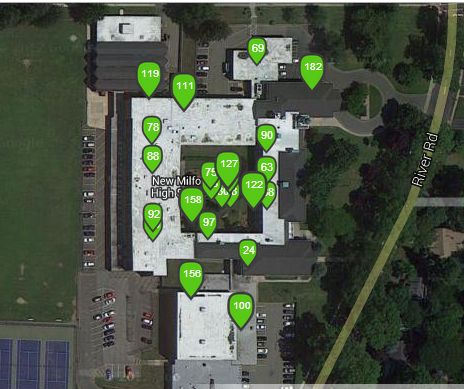
It was our desire and quest to create a school culture and learning environments that were more reminiscent of the real world that our learners would soon be a part of that drove change in this area. When I reflect upon how the program has evolved into it's current state I cannot help but to think about the most important change that was made recently.  It was during the summer that Ron Watson, the NM District IT Director, and I met to discuss the future of BYOD at NMHS. Up until this point we had students sign off on a paper guideline sheet after which I created a username and password for them to access the secure guest network.  This information was then passed on to Ron and each student that filled out the form was granted access.  There is no doubt in my mind that this process limited the amount of students who opted to bring their own mobile learning devices to school. I can't thank Ron enough for putting students first! Speaking of Ron, he just informed me that we had 460 unique devices connect to our guest Internet network yesterday (535 for the week) at my school. This is fairly significant as we only have 650 students and 53 staff members.  Take a look at the traffic at each access point below.


After critically analyzing our process and the culture of NMHS it was decided to change how we went about allowing students to access the Internet.  We decided to trash the old process reliant on paper and emails by replacing it with a seamless alternative that empowered students to want to bring their mobile devices to school.  This week I revealed these changes to our students.  While encouraging them to bring in their tools I explained that they could now access the Internet immediately with their current passwords and usernames that they have used to log onto school computers during their entire NMHS careers.  All they had to do now was bring in their device, select the guest network, enter their username/password, and check the box to agree to the terms of use. Then wallah, they would be connected to the Internet. Below is the terms that each student now has to agree to in order to access the Internet:


NMHS students and parents/guardians fully acknowledge that use of a personal device on the premises of New Milford High School is subject to all guidelines, rules and regulations governing acceptable use as established by the New Milford Public Schools Board of Education, Policy #2361 and Regulation R2361.  It is further understood that use of a personal device is restricted to those activities as required or related to the student's program of study and any use otherwise may be subject to disciplinary action including loss of device use privileges. Students WILL NOT access websites with inappropriate content using a 3G or 4G connection. Students and parents understand/agree that New Milford High School is NOT responsible for any damage or theft that may occur to the laptop while on school property. 
By logging into the New Milford wireless network, they are accepting the terms of the New Milford Student Responsible Use Guidelines. Once on the New Milford wireless network all users will have filtered Internet access just as they would on a district-owned device. 

Our BYOD initiative at NMHS has succeeded and grown up to this point based on the basic premise of trust and respect.  Yes, we have policies in place, the right infrastructure, and support our teachers with professional development and guidance. However, the most important elements stem from the fact that we trust our students to use their devices as tools for learning, enhanced productivity, and to conduct better research.  Time is spent working with them on digital citizenship and the creation of positive digital footprints that they can be proud of.  We also respect them as learners growing up in the digital age where these tools are playing a greater role in the world we are preparing them to succeed in.  When creating a BYOD initiative grounded in these principles the possibilities are endless.

What do you think are the keys to a successful BYOD initiative?

Thursday, March 28, 2013

The Device Conundrum - 1:1 vs BYOD


Cross-posted at the Huffington Post.

As we continue to advance in the digital age schools and districts are beginning to re-think pedagogy and learning environments by instituting either 1:1 device programs or Bring Your Own Device (BYOD) initiatives. In my opinion, schools that wish to create the most relevant and meaningful learning culture will go in one of these directions. It is tough to argue the potential impact of either program that is implemented diligently and with a focus on learning that will not result in the enhancement of essential skills sets that our students need to succeed in today's digital world. Probably the most significant impact, either 1:1 or BYOD can have is in the area of teaching digital responsibility, citizenship, and the creation of positive footprints online. After all, in the real world that we are preparing our students for, technological literacies and proficiencies are the cornerstones of numerous career paths.


Image credit: Tony Vincent learninginhand.com

The decision on which way to go is usually determined by finances, which is unfortunate for those schools and districts who have their hearts set on getting a device in the hands of each and every student. Competition resulting from the continuous evolution of tablets, laptops, and now Chrome books, puts schools in a better position to make large-scale investments in mobile technology. In theory and on paper, a 1:1 program seems to be the best program for schools wanting to integrate technology on a macro level to enhance teaching and learning. Advocates for 1:1 programs will claim that it is the only way to go as it ensures equitable access to all students regardless of socioeconomic status.

With each student possessing a device, collaborative work using Web 2.0 tools is a reality for all students, both in an out of school, provided there is Internet access at home. In this day and age, finding a location with free WiFi is not such a difficult task. Maintenance becomes less of a headache for the IT department, as they only have to worry about one type of device. It also figures to entail a more streamlined approach when it comes to providing professional development to staff so that the devices are consistently utilized to support student learning.

The general case I make for 1:1 programs above is compelling, but is it the best option for our students today? The more I read about others' thoughts on this and reflect on the BYOD program we have instituted at New Milford High School, I am beginning to think that 1:1 programs are not necessarily the best option for our students. My main reason for this shift in thought is why would we want to pigeonhole our students to one single device and/or platform? Is that reminiscent of the real world that we are supposedly preparing them to flourish and succeed in? The fact is many students own and are comfortable with their devices. The digital divide in schools becomes smaller when bold districts, schools, and educators work to effectively integrate the technology that has been available for years outside their walls. BYOD has the ability to save districts money, but the real impact comes in the form or engagement and empowerment of students to learn on their terms. I have grown quite tired of the myriad of excuses to not move towards BYOD because it can and will have a positive impact with the right mindset, training, and support.

It makes sense to me to create a technology-rich learning environment that leverages available technology with that, which the students already own. This is what we have done at my school and experienced a great deal of success. In addition to BYOD, students and teachers have access to three PC labs, one iMac lab, one Macbook cart, one PC cart, and one netbook cart. The equity issue with BYOD in classrooms has been overcome with school purchased technology and the use of cooperative learning after my teachers determine which device(s) each student possesses and brings to school on a regular basis. In my eyes we are accomplishing the same goals, for the most part, as we would if a 1:1 program had been instituted. Students have access to technology and are using it on a daily basis to communicate, collaborate, create artifacts of learning, problem solve, think critically, become more technologically proficient, and develop a greater global awareness. The should most certainly be able to use it to replace more archaic forms of technology (i.e. pencil and paper) if they wish.

I am extremely interested to hear what others think about 1:1 vs. BYOD in schools. Do you think one is better than the other and if so why? If you are considering going down one of these paths, which one would you lean towards?

Sunday, March 10, 2013

Our Doors Are Always Open

The following is a guest post by Steve D’Ascoli.  Steve visited New Milford High School on Thursday February 28, 2013.  NMHS routinely hosts visits from outside educators, schools, and organizations in an effort to provide insights on our initiatives.  Below is a reflection by Steve on his recent visit.

Today I had the opportunity to meet with Eric Sheninger before he headed off to the 2013 NASSP Conference.  I reached out to Eric to gain insight into the technologically driven mindset that has encapsulated New Milford High School. It was a great opportunity to not only get to exchange ideas with Eric regarding technology’s role in the classroom, but to see the learning community that has been nurtured and developed at his school.


Probably the most interesting idea Eric shared with me is how his school has structured their schedules to provide time for daily professional development.  In order to foster growth and development, a “PGP” (Professional Growth Period), allows teachers to have time to search for resources, share current practices, and collaborate with one another. An amazing, transformative decision, which can spur innovation and afford teachers the opportunity that no one ever has... time!  I don’t know if Eric was the brainchild behind that idea, but I have to tip my cap to whoever came up with that model.

It is also interesting that at New Milford High School, there are no mandates for teachers to use technology. Eric shared that teachers  are beginning to welcome the role of technology, as they are able to see how it not only makes their instruction more engaging, but also in many circumstances, easier on the teacher!  Through self-directed personal learning communities, and support from administration, Eric shared how teachers are empowered to take a different approach towards instruction because THEY want to.

As we navigated the hallways and classrooms, I was able to experience firsthand the school culture that is fostered at New Milford High School.  The students recognize their opportunities to use devices in school, and understand what the expectations are for appropriate use.  It was eye-opening to see that in a cafeteria filled with high school students that are allowed to use personal devices,95% of them were eating lunch, doing homework, and interacting in the same old fashioned ways!

Reflecting on this experience it is important to see how at my school district, we must establish specific goals that we intend to achieve by initiating a BYOD program at Valhalla Middle High School.  One interesting component that Eric mentioned is that part of the New Milford outlook is that cooperative learning is stressed, and that devices should be connecting students together.

I really appreciated the opportunity that Eric arranged for me to spend time together and demonstrate the educational climate at New Milford. I hope that I am able to use this experience to influence the teachers and students at my school in similar ways. I look forward to meeting Eric again soon and definitely at Edscape in October!

Steve D’Ascoli is a 5th year educator at Valhalla Middle High School in Valhalla, NY.  He has dual NYS certification in Secondary Social Studies and as an Educational Technology Specialist- daily utilizing both skill sets. As part of Valhalla’s Technology Committee, he is one of the leaders in driving the vision for  the District.  Steve is also currently leading Educational Technology instruction as an Adjunct Professor at Pace University and is obtaining a degree in School District Leadership.

Wednesday, January 23, 2013

Altering the Path to BYOD


The following is a guest post by Sherry Spier, a K-12 Media Specialist Coordinator in the Cinnaminson School District (NJ).  In this post Sherry reflects on here recent visit to New Milford High School, which took place on January 11, 2013.

For the last year, myself and four other members of the Cinnaminson School District staff worked relentlessly to start a pilot Bring Your Own Technology (BYOT) program at Cinnaminson High School. We worked together to create an Acceptable Use Policy (AUP) and a FAQ sheet for students and parents. We researched how other school districts began their program. We asked for volunteers.  I thought we took all the necessary steps to pilot this program. After meeting with Eric Sheninger and touring New Milford High School, I now recognize that we share similar goals for a successful technology program, but our steps have not overlapped to make the same progress. 

Image credit: http://info.netcenter.net/Blog/bid/230893/Small-Technology-Big-Risks-Top-5-Mobility-FAQs 

The technology committee took all of the necessary steps, but maybe not the correct path in implementing our BYOT program.  Our first steps should have involved our key stakeholders, the students. We did not ask them key questions which should have driven our implementation. We should have asked them what devices do they currently have and what are they using their devices for?  What can they show the teachers and administrators that we don’t already know?  What do students need to be able to do when they graduate that they can not currently doing that involves technology?  All of these questions (and more) should have been our first steps in the path to developing a BYOT pilot program.

As we forged our way ahead, the technology committee should have made a greater effort in enlightening the educators and administrators who are stakeholders in this process.  By not providing adequate support, in-service training, brainstorming, or sometimes an ear just to listen, we may have missed key components necessary for our goals to be met.  Most importantly, a level of trust amongst all stakeholders through proven accomplishments will move the pace of the program ahead by leaps and bounds.

The most important lesson I learned while meeting with Mr. Sheninger that will help guide us back on the right track is that I need to be the catalyst for change. My schedule allows me the freedom to pop into classrooms and assist teachers as needed.  I need to model what I know about technology and share that with administration and my peers.  I need to build enthusiasm for this program. 

Maybe the path we took to get where we currently are in our pilot is not the same path NMHS took to get where they currently are, but you can not change history.  Now is the time to retrace our path, make the necessary changes to continue to journey ahead, and move together to make Cinnaminson’s BYOT program a growing success. 

Thursday, January 10, 2013

Making Teachers' Lives Easier

The following is a guest post by Jessica Groff, an English teacher here at New Milford High School.  In this post she discusses her experience with a cloud-based technology solution called ClassLink. Jessica also teachers Digital Journalism and has worked with her students to create The Lance, our school's digital newspaper.


Four years ago, I left a desk job to become a teacher.  In my previous life, I would turn off the computer in the office at 5:00 and go home, not thinking about the files left at the office again.  When I began teaching, my world changed.  Although school ended at 3:00, my work continued.  From extra help, to grading papers, to creating assessments and coming up with activities, my profession reached far into my home life.  

I quickly realized that saving work on my computer at work was not going to be good enough anymore.  How could I open up a document and work on it at home at 7:00 at night when a great idea came to me if it was something that I had saved on my school computer during my preparation period at school?!

The first thing that I did was invest in a good flash drive.  It had lots of space, and it was handy because I kept it on my keychain, something that goes everywhere with me.  I began saving all of my work to my flash drive.  I could easily work on a document at home OR at school.  It was simple, lightweight, and convenient.  And then one day, my world came crashing down.  My flash drive had fallen off of my keychain.

Hours worth of work were lost forever.  

After this traumatic experience, I caved in and started emailing myself documents.  I would have different versions of the same document at home and at school, taking up space in my email, and I was always unsure of which version I had used latest.  It was confusing, but the only way that I could get done what needed to be done!

And then I came to New Milford High School, a school that has invested in and uses Classlink.  My life was saved!  With Classlink, I am able to save my documents to my personal drive on the school’s server, and access them from ANY computer with Internet capability.  I can download the document, work on it, and upload it back into my personal drive at work, even from home or on the go.  

Also, with Classlink, there is easy one-click access to various websites that we use the most often here at NMHS, such as PowerTeacher, SchoolDude (our work order request website), Google Apps, and virtually anything else that we may access on a regular basis.  It is a one-stop shop for all things education and ed-tech.

What I like the most about Classlink is that I can access it from anywhere.  My responsibilities at school do not keep me chained to my room all day.  I often move to different rooms, and sometimes I cannot just log on to the school server using my unique username and password.  At times like this, I can simply go to any computer that’s logged in and go to the Classlink website.  For example, today I was working with my Digital Journalism class in the Mac Lab on the lower level of our school.  A student needed a permission slip that I had drawn up on my computer on the third floor.  I simply logged onto Classlink, found the document, downloaded it, changed it to reflect what he needed, and printed it out on the spot. 

For the Apple users out there, there is an iPhone/iPad application, as well.  With the app, I can download documents into Evernote, or any other compatible processing app, and view or make changes to anything.  I often access my personal drive from the application during meetings to discuss projects and assessments or curriculum with colleagues, which makes on-the-spot collaboration much more interactive.  Instead of saying, “I’ll email you the document,” or running to my classroom to print it out and run back to my waiting colleagues, I can open any document on my cell phone and show it to my colleagues at that very moment, and we can move forward with our discussion.

I really cannot say enough great things about Classlink.  It has made my life so much easier in so many ways when it comes to planning, preparation, and collaboration, the three keys to being a teacher.  I know what life was like before, and I’m so glad that NMHS found Classlink!  

We are also using ClassLink here at NMHS as a cloud-based Bring Your Own Device (BYOD) solution.  It is a fantastic resource for schools looking to streamline their BYOD initiatives. 

Thursday, July 12, 2012

Streamlining BYOD With ClassLink


After a semester long pilot program with the senior class during the spring of 2011, we rolled out our Bring Your Own Device (BYOD) program to the entire student body in September.  Throughout the entire 2011-2012 school year, we worked to refine our approach, implementation, and learning outcomes for the program.  The model that we developed is customized, based on our student body and overall objectives of the program. 

Students are permitted to use their devices for learning during non-instructional time (i.e. lunch) or in class at the discretion of the teacher.  Mobile learning devices (i.e. cell phones) have been successfully integrated as student response systems using free web 2.0 tools such as Poll Everywhere and Celly.  Smartphones and Internet accessible devices have been used by students to conduct web-based research, take notes using Evernote, manage work through Google Docs or Dropbox, organize their assignments on their calendars, and develop projects with a variety of other tools.  Even though our school has more than enough available technology in four computer labs and two mobile carts, some students are more comfortable working on their own devices.

One thing we quickly realized is that our students owned and brought a diversity of devices to school including smartphones, iTouches, iPads, laptops, and other tablet devices (Kindles, Nooks, Playbooks, etc.).  The challenge then became how to deliver a uniform experience across all devices in order to assist with the teaching and learning process.  The solution came in the form of an award winning, web-based application called ClassLink Launchpad. 


With ClassLink students and teachers can access a customized dashboard that is pre-loaded with a variety of tools that are used on a regular basis.  I was able to establish the specific tools added to each of the respective dashboard (teacher, student).  The best part is that for both groups the dashboard appears the same no matter the device that is used to login and access it. Below is what the dashboard looks like for my teachers.


Setup was a breeze, which was managed by both representatives from ClassLink and my IT department.  Student and staff information was uploaded from our information management system (PowerSchool) in a seamless fashion. Existing usernames and passwords for both teachers and students could be used to access the ClassLink Launchpad application.  An added bonus for my teachers was that Classlink allowed them access for the first time to their school drive, which we call the p drive.  With this feature on their dashboard they could not only access files that have been saved for years at home, but they could also work from these same files now at home and conveniently save.

We began using ClassLink late in the spring, but are extremely excited about the promise that this solution holds to enhance the teaching and learning culture of our school through BYOD.  There are so many more features that my teachers and I will explore in the coming months.  More training and webinars will be provided for my staff so they are comfortable using ClassLink with learning in in mind.  We will also focus on making students aware of ClassLink and the dashboard that has been specifically created for them.

How do you manage your BYOD program if you have one at your school?  If you don't, what are the factors holding you back?