I am a huge fan of Buncee. The following is a guest post by Rachelle Dene Poth (@Rdene915), Spanish and STEAM Teacher at Riverview High School in PA.
For several years, Buncee has been one of my favorite creation tools; both for personal use and for classroom instruction. While there are many digital tools to choose from when it comes to teaching and having our students create, Buncee’s versatility and ease-of-use make it a go-to tool for all creative needs. Now, Buncee’s recent integration with Microsoft’s Immersive Reader makes the platform even more accessible for students of diverse ages, backgrounds, and abilities to learn 21st-Century Skills and express themselves. What my students love the most is that Buncee offers something for everyone, and I love that they love it.
Always keeping a finger on the pulse of their community’s needs, the Buncee team consistently listens to their community and refines the platform based on this! Their integration with Immersive Reader is a perfect example of this.
Immersive Reader: It’s About Opportunities For ALL Students
This summer, Buncee integrated with Microsoft’s Immersive Reader, increasing accessibility for students and offering a robust environment to build literacy skills. Immersive Reader is a full-screen accessibility tool, supporting the readability of text in Buncees for language learners and their families and students with dyslexia or visual impairments. Any text added into a Buncee can be translated and read aloud in over 60 languages.
There are many ways Immersive Reader can enhance learning opportunities for students. It can help to build their confidence and create an inclusive classroom environment. Educators can use this integration to create lessons, make interactive flashcards for students, and communicate with families. Inclusive learning and providing for students and families from different backgrounds is something that the Buncee and the Microsoft team are definitely passionate about, making this integration a natural fit.
Imagine the possibilities for reaching students and their families of non-native English speaking homes, or supporting students who are just learning to read. The use of Immersive Reader in Buncee enables students to do more than just create multimedia content, it helps them improve reading and language learning skills as they engage with the content in authentic and meaningful ways.
How Does Immersive Reader Work in Buncee?
There are several ways to help students build their skills through the different options available within Buncee and using Immersive Reader. Getting started with Immersive Reader in Buncee is easy.
By clicking on the Immersive Reader icon when viewing a Buncee, a personalized reading and learning experience for students appears. Immersive Reader accesses the text in the Buncee, offering a multitude of options. Families can access these features at home as well, without having to log into or need any specific account.
Navigating the Immersive Reader Functionality In Buncee
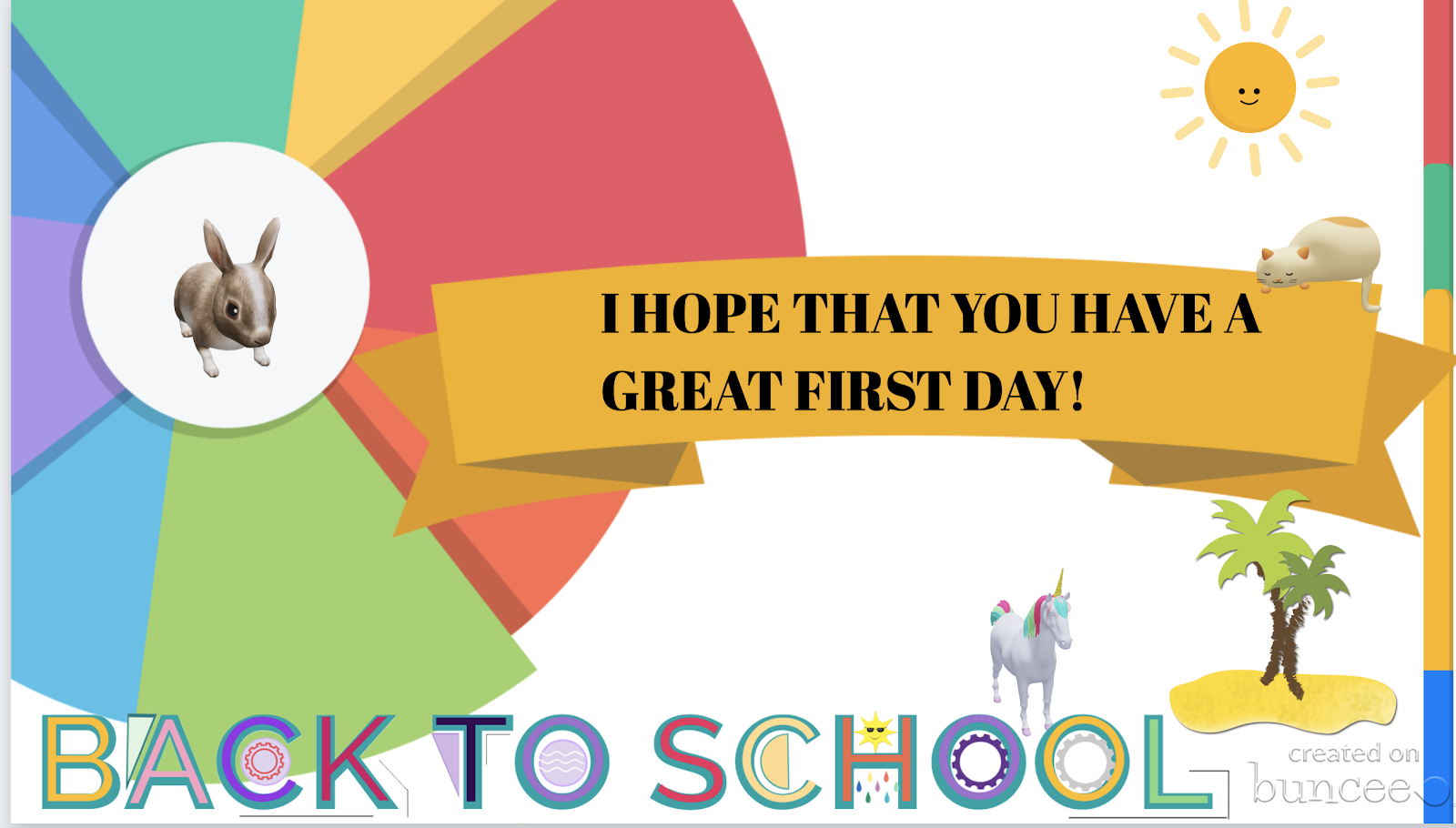
I decided to create a Buncee using some of the new 3D objects and also explore the options available through Immersive Reader. For first time users, it is easy to figure out how to adjust the settings.
First, I clicked on the speaker symbol at the bottom to listen to the text read aloud. Students could use this as a way to practice their own pronunciation, especially when using it for language learning, by repeating after the speaker. Students can also build listening comprehension skills by focusing on written words and making connections with the audio.
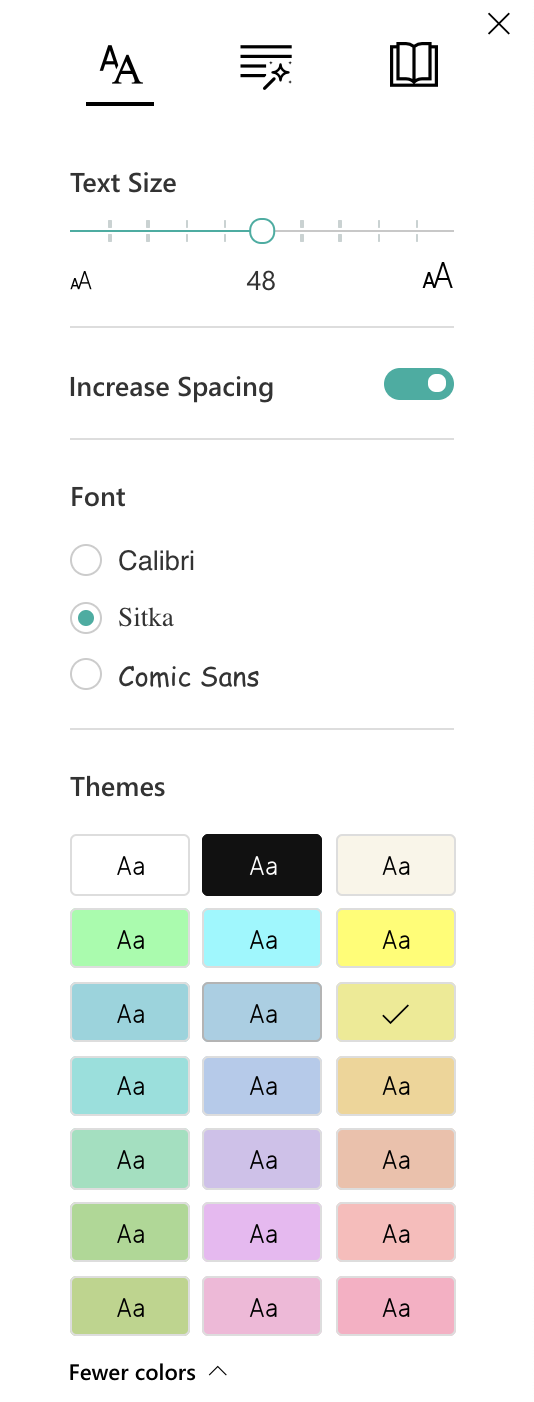
By clicking on text preferences, I can choose the text size, increase spacing, and select from three choices in font style. These are great options to help with readability for students. There are also 21 color choices for the background on the screen. I find this to be very useful, especially as someone who can be sensitive to certain colors when reading. I've also had students experience difficulty with reading on certain colored backgrounds, so this is a definite plus.
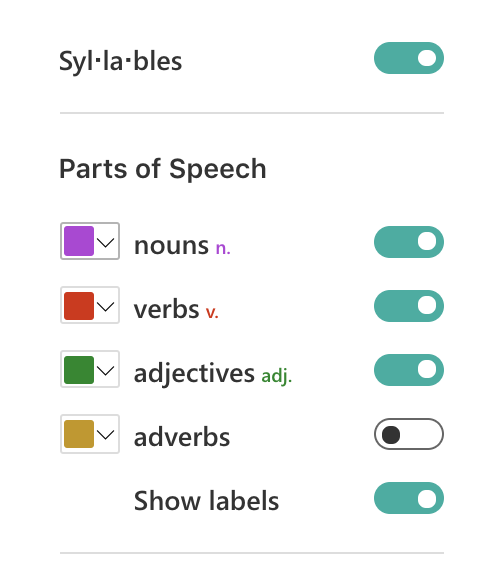
The grammar options enable you to break words up by syllables and also color code the different parts of speech. Being able to use the color codes to help with the identification of nouns, verbs, adjectives, and adverbs will help students to build their grammar skills. These labels can be turned on or off, which means that families can work with their children and use it as a teaching tool for review.

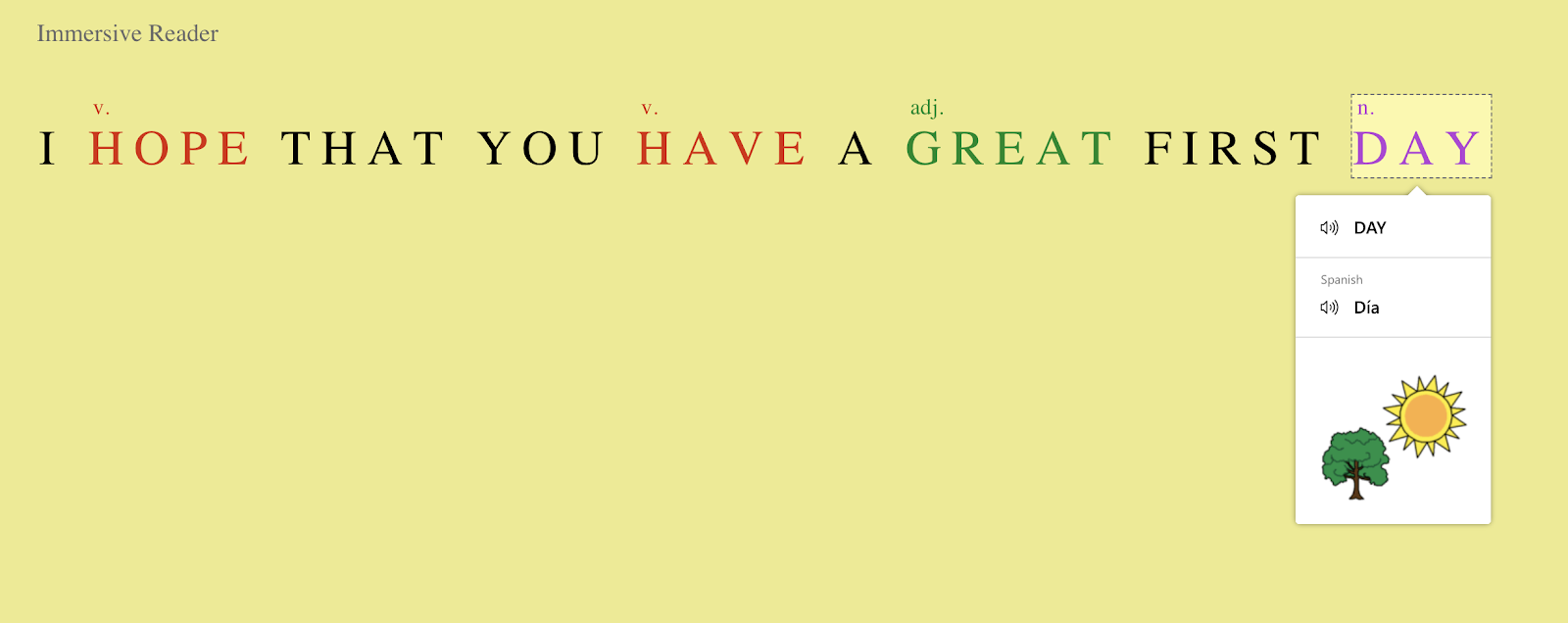
Just to experiment, I turned everything off except for the verbs. Displayed on the screen were the two verbs in the sentence both highlighted in red. I then selected a different color for each part of speech, I chose purple to identify nouns and green for the adjectives. I was amazed at how quickly this could be set up and the possibilities for helping students with reading comprehension and language skills. Using this as a way to further engage students with identifying parts of speech and making the visual connection is another option for more interactive learning.
Under reading preferences, you can focus on one line or on the entire text.
When you focus on a line, it closes the screen down to that one specific sentence, which you can also make narrower or thicker depending on your choice.

There are more than 60 languages available for translation. I decided to try French first, and when I clicked on a word, it showed me the word in French and in English. I also explored other languages, including Spanish and was impressed with how much it offered to reinforce the content and to provide a more personalized learning experience for students. There is also a picture dictionary to visually reinforce vocabulary acquisition. You can choose the voice and speed of reading, so it provides a great way to reinforce speaking skills as well as listening, reading and writing.
In his book, Digital Leadership, Eric Sheninger talks about the critical competencies needed by learners for success in today’s world. These competencies are in alignment with the ISTE standards for students and teachers and can be addressed through the use of Buncee. Now with the Immersive Reader integration, the possibilities to address these standards are open to all learners. Beyond the potential for creativity, collaboration, critical thinking, and communication, students using Buncee can build skills in digital media literacy, entrepreneurship, technological proficiency, and digital citizenship. Students have the opportunity to use technology as a tool for solving real-world problems and making real-world connections. We have to look beyond simply using digital tools to engage students in learning and instead, empower them through opportunities to apply what they have learned in unique ways.
For several years, Buncee has been one of my favorite creation tools; both for personal use and for classroom instruction. While there are many digital tools to choose from when it comes to teaching and having our students create, Buncee’s versatility and ease-of-use make it a go-to tool for all creative needs. Now, Buncee’s recent integration with Microsoft’s Immersive Reader makes the platform even more accessible for students of diverse ages, backgrounds, and abilities to learn 21st-Century Skills and express themselves. What my students love the most is that Buncee offers something for everyone, and I love that they love it.
Always keeping a finger on the pulse of their community’s needs, the Buncee team consistently listens to their community and refines the platform based on this! Their integration with Immersive Reader is a perfect example of this.
Immersive Reader: It’s About Opportunities For ALL Students
This summer, Buncee integrated with Microsoft’s Immersive Reader, increasing accessibility for students and offering a robust environment to build literacy skills. Immersive Reader is a full-screen accessibility tool, supporting the readability of text in Buncees for language learners and their families and students with dyslexia or visual impairments. Any text added into a Buncee can be translated and read aloud in over 60 languages.
There are many ways Immersive Reader can enhance learning opportunities for students. It can help to build their confidence and create an inclusive classroom environment. Educators can use this integration to create lessons, make interactive flashcards for students, and communicate with families. Inclusive learning and providing for students and families from different backgrounds is something that the Buncee and the Microsoft team are definitely passionate about, making this integration a natural fit.
Imagine the possibilities for reaching students and their families of non-native English speaking homes, or supporting students who are just learning to read. The use of Immersive Reader in Buncee enables students to do more than just create multimedia content, it helps them improve reading and language learning skills as they engage with the content in authentic and meaningful ways.
How Does Immersive Reader Work in Buncee?
There are several ways to help students build their skills through the different options available within Buncee and using Immersive Reader. Getting started with Immersive Reader in Buncee is easy.
By clicking on the Immersive Reader icon when viewing a Buncee, a personalized reading and learning experience for students appears. Immersive Reader accesses the text in the Buncee, offering a multitude of options. Families can access these features at home as well, without having to log into or need any specific account.
Navigating the Immersive Reader Functionality In Buncee
I decided to create a Buncee using some of the new 3D objects and also explore the options available through Immersive Reader. For first time users, it is easy to figure out how to adjust the settings.
First, I clicked on the speaker symbol at the bottom to listen to the text read aloud. Students could use this as a way to practice their own pronunciation, especially when using it for language learning, by repeating after the speaker. Students can also build listening comprehension skills by focusing on written words and making connections with the audio.
By clicking on text preferences, I can choose the text size, increase spacing, and select from three choices in font style. These are great options to help with readability for students. There are also 21 color choices for the background on the screen. I find this to be very useful, especially as someone who can be sensitive to certain colors when reading. I've also had students experience difficulty with reading on certain colored backgrounds, so this is a definite plus.
The grammar options enable you to break words up by syllables and also color code the different parts of speech. Being able to use the color codes to help with the identification of nouns, verbs, adjectives, and adverbs will help students to build their grammar skills. These labels can be turned on or off, which means that families can work with their children and use it as a teaching tool for review.
Just to experiment, I turned everything off except for the verbs. Displayed on the screen were the two verbs in the sentence both highlighted in red. I then selected a different color for each part of speech, I chose purple to identify nouns and green for the adjectives. I was amazed at how quickly this could be set up and the possibilities for helping students with reading comprehension and language skills. Using this as a way to further engage students with identifying parts of speech and making the visual connection is another option for more interactive learning.
Under reading preferences, you can focus on one line or on the entire text.
When you focus on a line, it closes the screen down to that one specific sentence, which you can also make narrower or thicker depending on your choice.
There are more than 60 languages available for translation. I decided to try French first, and when I clicked on a word, it showed me the word in French and in English. I also explored other languages, including Spanish and was impressed with how much it offered to reinforce the content and to provide a more personalized learning experience for students. There is also a picture dictionary to visually reinforce vocabulary acquisition. You can choose the voice and speed of reading, so it provides a great way to reinforce speaking skills as well as listening, reading and writing.
In his book, Digital Leadership, Eric Sheninger talks about the critical competencies needed by learners for success in today’s world. These competencies are in alignment with the ISTE standards for students and teachers and can be addressed through the use of Buncee. Now with the Immersive Reader integration, the possibilities to address these standards are open to all learners. Beyond the potential for creativity, collaboration, critical thinking, and communication, students using Buncee can build skills in digital media literacy, entrepreneurship, technological proficiency, and digital citizenship. Students have the opportunity to use technology as a tool for solving real-world problems and making real-world connections. We have to look beyond simply using digital tools to engage students in learning and instead, empower them through opportunities to apply what they have learned in unique ways.